In this article:
- Why code signing certificates now expire sooner
- How certificate labels remove thumbprints from build scripts
- How to rotate and renew API keys safely
- How to automate the process in Continua CI
Shorter Certificate Lifetimes Are Coming
Code signing certificates used to last up to three years. As of March 1, 2026, that is no longer the case.
The CA/Browser Forum adopted Ballot CSC-31 on November 17, 2025, reducing the maximum validity period for publicly-trusted code signing certificates from 39 months to 460 days (roughly 15 months). For most teams, that means certificate renewals are now an annual operational task rather than an occasional one.
When a certificate is renewed, it receives a new thumbprint, and build scripts that reference the old thumbprint must be updated. In large CI/CD environments, tracking down every reference can be tedious and error-prone.
Separately, API keys used by CI agents to authenticate with the signing server have their own lifecycle and eventually need to be rotated. Replacing them without interrupting active build pipelines can be challenging.
Signotaur addresses both concerns. Label-based certificate selection decouples build pipelines from individual certificates, while API key rotation with overlap allows credentials to be replaced without downtime. Together they turn what used to be stressful maintenance tasks into routine operations.
Certificate Labels: Automatic Certificate Rotation
The Thumbprint Problem
Traditionally, build scripts reference a code signing certificate by its SHA-1 thumbprint — a 40-character hex string that uniquely identifies the certificate. When you renew, you get a new certificate with a new thumbprint, so every script that signs code needs to be updated. If you sign across multiple CI configurations, that means tracking down and editing each one.
Labels to the Rescue
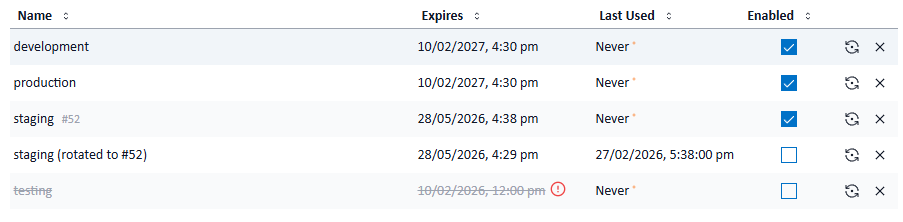
Signotaur lets you assign a label to each registered certificate — for example, production or nightly. When you request a signing operation by label instead of thumbprint, Signotaur automatically selects the certificate with the latest expiry date among all enabled, non-expired certificates that share that label. This ensures that newly issued certificates automatically take precedence.
The rotation workflow is straightforward:
- Register your renewed certificate and assign it the same label as the outgoing one.
- Builds automatically pick up the new certificate — no script changes required.
- The old certificate expires naturally; remove it from Signotaur when you're ready.
Expiration Monitoring
Signotaur's background monitoring service checks certificate expiration daily and sends email notifications to administrators at configurable intervals. The defaults are 30, 14, 7, 3, and 1 day(s) before expiry, with an additional alert if a certificate has already expired. You can customise these warning thresholds in the server configuration.
During a rotation window — when both the old and new certificates are registered with the same label — the admin UI highlights the duplicate label so you can confirm the overlap is intentional.

API Key Rotation with Overlap
Why Rotate Keys?
API keys grant access to your signing service. If a key is leaked or reused indefinitely, it becomes a long-lived security risk. Regular rotation limits the impact if a key is compromised, satisfies compliance requirements, and handles natural key expiry gracefully. But naive rotation — revoke old, issue new — creates a window where CI agents holding the old key start failing.
How Signotaur Handles It
The rotate-key command creates a new API key while keeping the old one valid for a configurable overlap period of 0–30 days (default: 7 days). During this window, both keys are accepted, allowing CI agents and environments to transition without interruption.
Once the overlap period expires, the old key is automatically revoked. If you prefer to manage revocation manually, pass --no-auto-revoke and the old key will remain valid until you explicitly revoke it.
Safety Guardrails
- Role required — users must be assigned the ApiKeyRotator role before they can rotate keys. An administrator can assign this role in the Signotaur admin UI.
- Rate limiting — a maximum of 5 rotations per user per 24-hour period prevents accidental key sprawl.
- Linear chain only — a key that has already been rotated cannot be rotated again; you must use the successor key. This prevents branching into multiple active key chains.
- Proactive expiry checking — the sign command accepts a
--fail-if-expiring-within flag (e.g. 14d). If the API key used for signing will expire within that window, the command fails immediately with a clear message — catching the problem in CI before it causes a real signing failure.
Conditional Rotation
The --if-expiring-within flag on rotate-key makes rotation idempotent: the key is only rotated if it expires within the specified duration (e.g. 14d, 1w, 24h). This makes it safe to run rotate-key on every CI build or on a nightly schedule without generating unnecessary keys.
Example scheduled rotation command:
signotaur rotate-key --if-expiring-within 14d
Key Renewal
By default, a rotated key inherits the old key's expiry date. If the old key had 30 days of validity remaining, the new key also expires in 30 days. Over time, repeatedly rotating a key gradually shortens its remaining lifetime — which can be a problem for long-running automation.
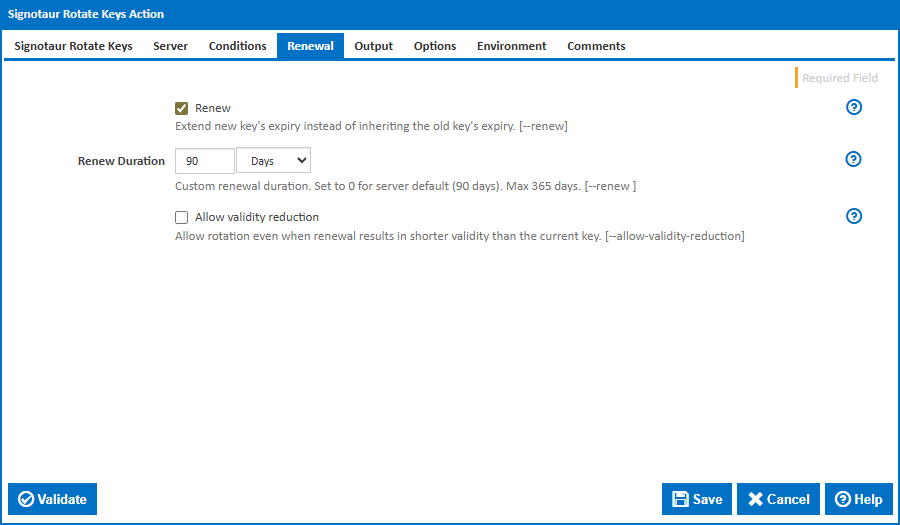
The --renew flag gives the new key a fresh validity period starting from the rotation date, rather than inheriting whatever time was left on the old key. Without a value, it uses the server default of 90 days; with a value (e.g. --renew 180d), it sets a specific duration up to a maximum of 365 days.
This pairs naturally with conditional rotation — check whether the key is approaching expiry, and if so, rotate and renew in a single command:
signotaur rotate-key --if-expiring-within 14d --renew
If the renewal duration would be shorter than the old key's remaining validity (for example renewing for 30 days when 60 days remain), the command fails as a safety measure. Pass --allow-validity-reduction to override this check when the shorter duration is intentional.
Putting It Together in Continua CI
Continua CI ships dedicated Signotaur actions for both signing and key rotation, so you can wire up the entire workflow without writing any custom scripts. Before configuring those actions, you'll need to assign a label to your certificates in the Signotaur admin UI.
Assigning a Label to Your Certificates
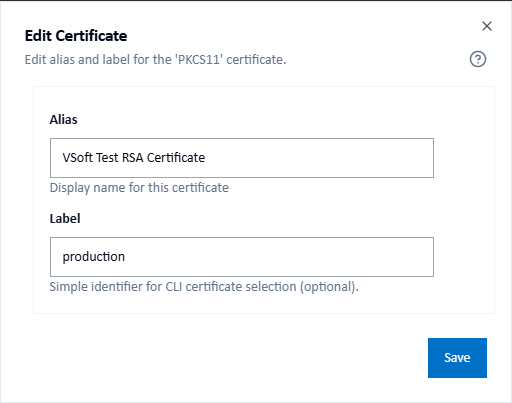
In the Signotaur admin UI, navigate to Certificates and either add a new certificate or edit an existing one. In the certificate dialog you'll find two name fields:
- Alias — a unique display name for the certificate (auto-generated by default, e.g. "CodeSigningCert (2027-12-31)").
- Label — an optional identifier used for CLI and CI/CD certificate selection, e.g.
production. Multiple certificates can share the same label. Matching is case-insensitive, so Production and production resolve the same way.
When you renew a certificate, register the new one and assign it the same label as the outgoing certificate. The admin UI will show an orange notice confirming that multiple active certificates share the label and that the one with the latest expiry will be selected automatically. No build script changes needed.
For full details, see the Certificates documentation.
Setting Up the Rotate Keys Action
Add the Signotaur Rotate Keys action to a stage — either in a scheduled maintenance configuration or directly in your build configuration. With the If Expiring Within condition the action only rotates the key when expiry is approaching, so it can safely run on every build.
The action is organised into several tabs:
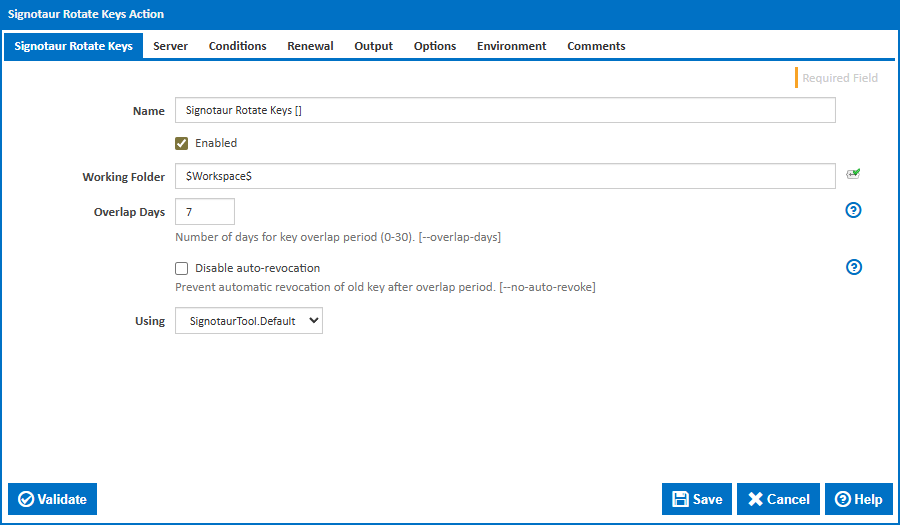
Signotaur Rotate Keys tab — configure Overlap Days (how long the old key remains valid alongside the new one, default 7) and whether to Disable auto-revocation if you prefer to revoke old keys manually.
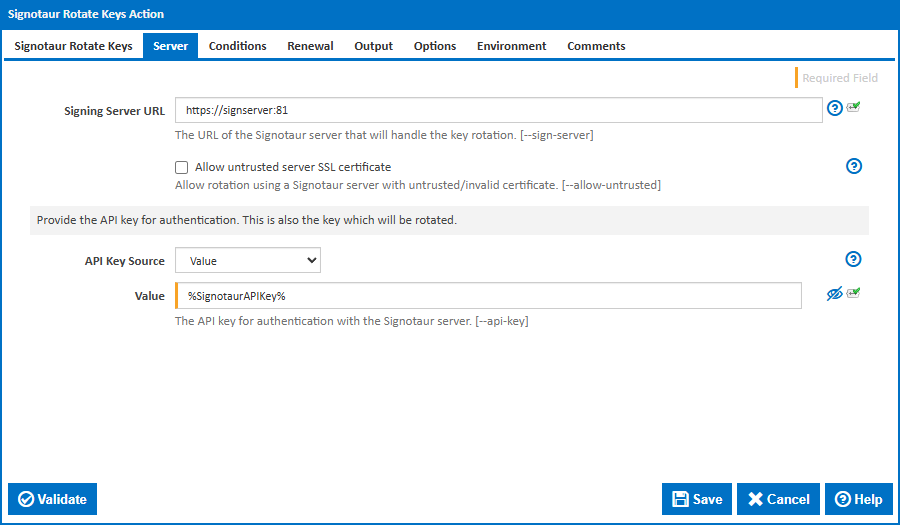
Server tab — set the Server URL for your Signotaur instance and the API Key Source. Select Value (from variable) and reference a server variable (e.g. %SignotaurAPIKey%) to avoid hard-coding keys in the action.
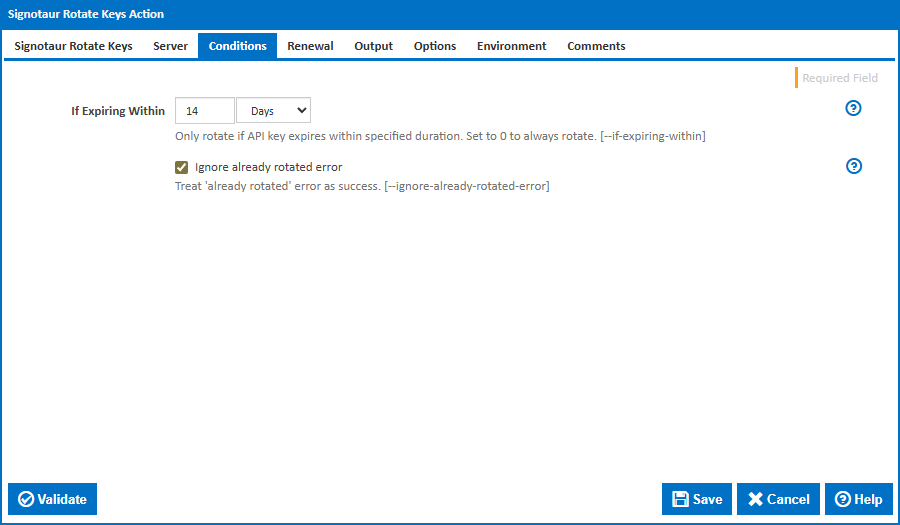
Conditions tab — set If Expiring Within to make the rotation conditional (e.g. 14d to only rotate if expiry is within two weeks). Enable Ignore already rotated error to safely run the action in concurrent CI builds without failure if the key was already rotated by another build.
Renewal tab — enable the Renew checkbox to give the new key a fresh validity period instead of inheriting the old key's remaining lifetime. Set a specific Renew Duration (e.g. 90d), or leave it blank to use the server default. Check Allow validity reduction if the renewal duration may be shorter than the old key's remaining validity.
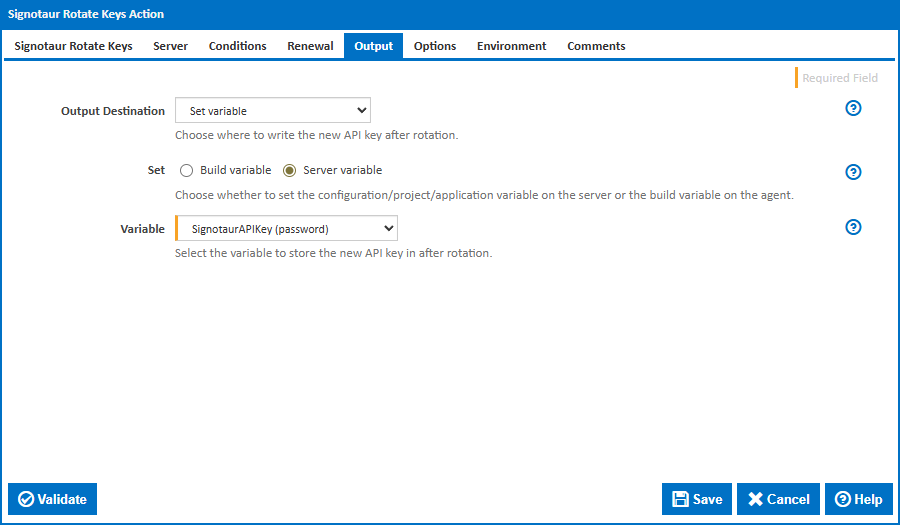
Output tab — choose Set Variable as the output destination and select a Server variable to store the new key. This way your sign actions automatically pick up the rotated key without any manual updates.
Full documentation: Signotaur Rotate Keys Action
Setting Up the Sign Action with Label Selection
Add the Signotaur Sign action to your build stage, after compilation and before packaging.
Key fields:
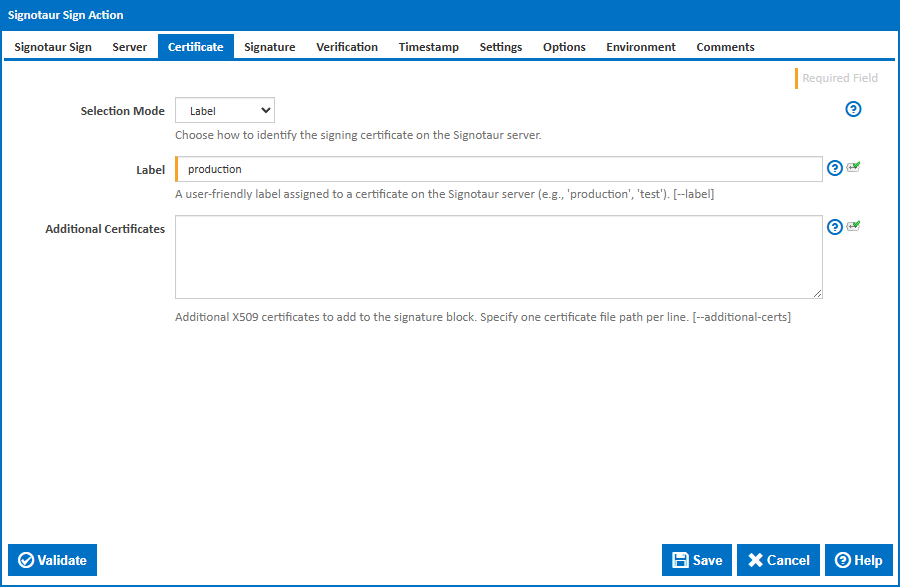
- Files to Sign — glob patterns for your build output, e.g.
**/*.exe, **/*.dll.
- Certificate Selection Mode — set to Label.
- Label — your shared label, e.g.
production. Signotaur will automatically select the certificate with the latest expiry date.
- API Key Source — point to the server variable populated by the Rotate Keys action, or a securely stored key.
- Fail If Expiring Within — e.g.
14d. If the API key expires within two weeks, the action fails early so you can rotate before it becomes a blocker.
- Timestamp Server & Digest — configure your preferred timestamping authority and hash algorithm.
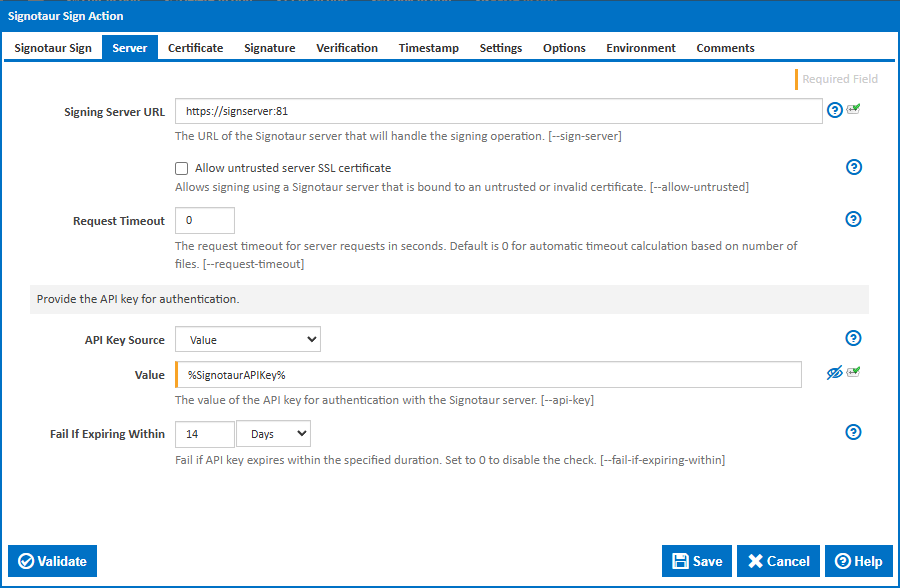
Full documentation: Signotaur Sign Action
Typical Rotation Workflow
In practice, certificate and API key rotation can be handled with a small amount of scheduled automation in your CI system.
- Register renewed certificates in Signotaur and assign them the same label as the previous certificate.
- CI builds continue using the label, automatically selecting the certificate with the latest expiry date.
- Schedule periodic API key checks using the
rotate-key --if-expiring-within option.
- The new key is written to a CI server variable, allowing build pipelines to automatically use the rotated key.
- Use
--renew so rotated keys receive a fresh validity period rather than inheriting the old key's remaining lifetime.
- Retire old certificates and keys once they are no longer needed.
Wrapping Up
With code signing certificate lifetimes dropping to roughly 15 months, the days of "set it and forget it" certificate management are over. Signotaur's label-based signing means your CI/CD pipelines don't need to know — or care — which specific certificate is current. And overlap-based API key rotation ensures you can swap credentials without any signing downtime.
These features are already available in Signotaur. If you're evaluating it, check out the Signotaur documentation to get started.