Software supply-chain security has become increasingly important over the last few years. One of the things you are likely to encounter if you work on software for larger organisations, government, or regulated industries is the requirement to provide a Software Bill of Materials, or SBOM.
If you've not come across SBOMs before, the basic idea is pretty simple: an SBOM is a list of the software components that make up an application. Rather than just saying "this application uses some third-party libraries", you have a machine-readable document (typically json) that identifies those libraries and, where possible, their versions and other useful information.
This is useful when you need to answer questions such as:
- Which third-party libraries does this application use?
- Which version of a library was included in a particular release?
- Are we using a library that has a known security vulnerability?
- Which applications are affected if a particular library turns out to have a problem?
- What open source components are included in software we are delivering to a customer?
SBOMs aren't just about security either. They can be useful for licensing reviews, compliance, software maintenance and simply understanding what is actually going into a build.
There are several SBOM formats, but two of the commonly used standards are CycloneDX and SPDX.
So how do we do this with Delphi?
The problem with Delphi dependencies
If you have been developing Delphi applications for a while, you probably already know that keeping track of third-party libraries isn't always straightforward.
There isn't traditionally a single dependency file that tells you everything your application depends on. A project might have components installed into the IDE, libraries checked into source control, search paths pointing at various directories, and third-party source code sitting somewhere on the developer's machine.
This makes it rather difficult to answer a seemingly simple question:
What exactly went into this executable?
This is one of the reasons I have been working on DPM, a Delphi Package Manager.
DPM provides a standard way of installing and managing Delphi libraries and their dependencies. Packages can declare their dependencies, and DPM takes care of installing the appropriate versions for your Delphi compiler and target platform.
DPM also gives us something particularly useful when it comes to SBOMs: it knows what packages your project depends on (and their dependencies).
Generating an SBOM with DPM
DPM has an sbom command which generates an SBOM for a Delphi project or project group.
For example:
dpm sbom .\\MyProject.dproj
That's it.
By default, DPM generates CycloneDX and SPDX JSON files for each enabled platform in the project.
You can also specify the output directory and format. For example, if you only want a CycloneDX SBOM:
dpm sbom .\\MyProject.dproj -outdir=.\\artifacts -format=cyclonedx
Or you can generate the human-readable HTML and Markdown reports:
dpm sbom .\MyProject.dproj -format=html,markdown
There are a few other options available, including selecting the platforms and build configuration.
You can also run it against a project group:
dpm sbom .\\MyProjectGroup.groupproj
By default this produces an aggregated SBOM for each platform in the group. If you prefer the older behaviour of producing an SBOM for each individual project, you can use -per-project.
The full command documentation is available in the DPM documentation.
What does DPM actually find?
DPM finds dependencies from two sources:
- DPM package metadata. DPM follows the dependency chain of every DPM package used by the project and includes those packages in the SBOM.
- The Delphi linker MAP file. This identifies libraries that were linked into the application but are not managed by DPM.
The MAP file is omportant because there is a difference between:
"This directory is in my search path"
and:
"Code from this library was actually linked into my application."
The latter is what we are interested in when generating an SBOM.
Set Linking > Map file to Detailed for the build configuration being analysed. For example, when analysing a Release build, enable it for the Release configuration.
If DPM cannot find the MAP file, it warns you and generates a partial SBOM by default. To fail the command instead, use -strict:
dpm sbom .\MyProject.dproj -strict
That can be useful in a build process where you don't want an SBOM to be accidentally published without all of the dependency information.
Why use DPM for dependency management?
You don't need to use DPM to generate an SBOM.
However, using a package manager makes the whole process considerably more useful.
If your dependencies are managed by DPM, you have a known package name and version rather than relying entirely on whatever happens to be installed on a particular developer's machine.
For example, instead of having a project that depends on some source directory called:
C:\\SomeLibrary\\Source
you can have a project dependency on a particular DPM package and version.
That gives you reproducible builds, makes setting up a new development machine easier, and gives DPM much more information to work with when generating the SBOM.
It also means the dependency information is part of the project rather than being hidden away in the configuration of a particular developer's machine.
This is one of the reasons I think package management and SBOM generation fit together particularly well.
Adding SBOM generation to a FinalBuilder build
The latest update to FinalBuilder includes a DPM SBOM action.
The action wraps the DPM SBOM functionality, so you can add SBOM generation directly to your Finalbuilder project.
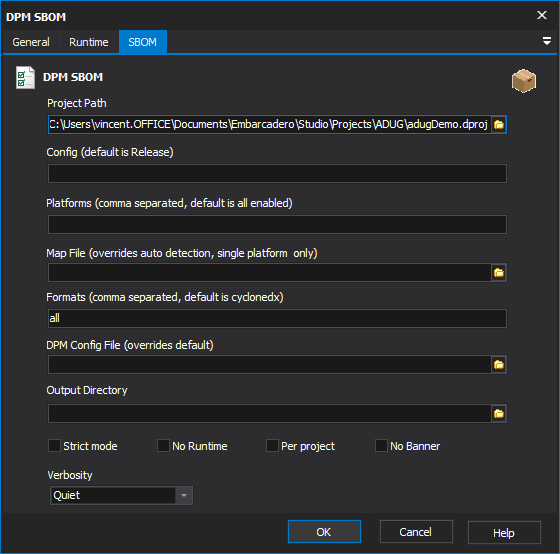
The basic process is very simple:
- Add the DPM SBOM action.
- Specify the project or project group.
- Choose where you want the SBOM files written.
- Select the format(s) you want.
- Configure other options as needed.
The important part here is that SBOM generation becomes just another step in your build process. You don't need a separate script that somebody has to remember to run. You don't need to manually generate an SBOM when a customer asks for one. And you don't need to remember to update it when the dependencies change. It can simply be generated every time you produce a release build.
The resulting SBOM can then be included with your build artifacts. This is particularly useful if you are producing software for customers who require an SBOM as part of their software delivery process.
Which format should I use?
If you're not sure, I'd start with CycloneDX.
DPM generates CycloneDX 1.6 JSON by default, and this is a good format if the SBOM is going to be consumed by another security or software supply-chain tool.
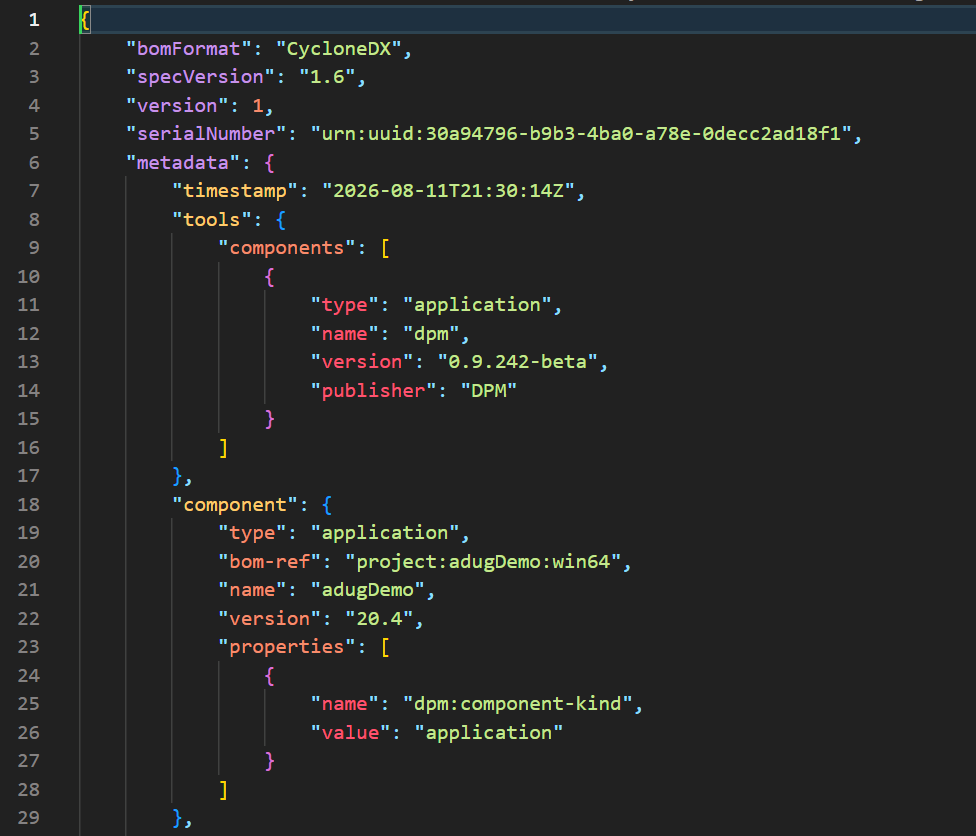
SPDX is another widely used standard, and DPM can generate that too.
If you just want something that a person can read, the HTML or Markdown output is useful.
You can also generate everything:
dpm sbom .\MyProject.dproj -format=all
This gives you machine-readable output for tools as well as something that is convenient to look at yourself.
SBOMs aren't just for security teams
It's tempting to think of SBOMs as something that only matters if you're working for a large company with a security team.
I don't think that's necessarily the case. Even on a relatively small Delphi project, having a record of what went into a release can be useful.
Imagine that six months from now a vulnerability is announced in a library you use. If you have an SBOM for every release, you can look at the SBOMs and quickly determine which releases contain that library.
Without an SBOM, you might have to remember which version of the library you were using, work out which branch or project was built at the time, and then try to determine whether that code actually made it into the executable.
An SBOM turns that into a much simpler question.
You can also keep the SBOM alongside your other build artifacts, so you have a historical record of the software that you shipped.
DPM makes this easier
SBOM generation wasn't the original reason for building DPM, but once you have proper dependency information, generating an SBOM becomes a natural extension.
DPM is also designed to work alongside existing Delphi projects and libraries. You don't have to move everything to DPM before you can start using it, and the SBOM command can use the linker MAP file to find non-DPM dependencies too.
That means you can start small.
You could begin by using DPM for a few of your third-party libraries, use the dpm sbom command to see what it produces, and then gradually move more dependencies under package management as it makes sense for your projects.
And if you're already using FinalBuilder, adding SBOM generation to your build is particularly easy with the DPM SBOM action.
Getting started
If you haven't tried DPM yet, take a look at delphi.dev.
DPM supports Delphi XE2 and later and provides both command-line and IDE integration. It can install and restore packages, manage dependencies, work with multiple package sources, and handle package signing and trust.
The SBOM functionality is just one of the things it can do.
If you already have DPM installed, try this from your project directory:
dpm sbom MyProject.dproj
You might be surprised at how much information it can find.
And if your builds are already managed with FinalBuilder, add the DPM SBOM action to your build and let FinalBuilder generate the SBOM every time you build.
Once it's part of the build, you don't really have to think about it anymore.
Which is probably where this sort of thing belongs.