Hi @ktopaz,
We are planning to add a new field to Dropdown Selection variable prompt so that you can specify labels and values. This will allow the use to select a label, e.g. the channel name, but the variable gets set to another value, e.g. the channel URL or a variable which expands to the channel URL.
Meanwhile, there are a couple of options:
- Use
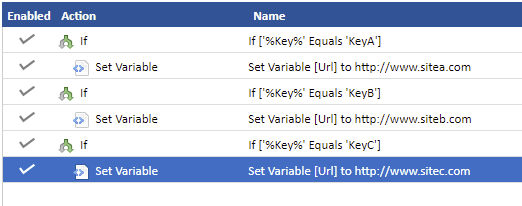
IfandElseactions along withSet Variableactions to set a new variable based on the value of the key variable e.g.
- Add a number to the start of each of the keys and use this number to select a item from a list in another variable. e.g.
With the following variables:
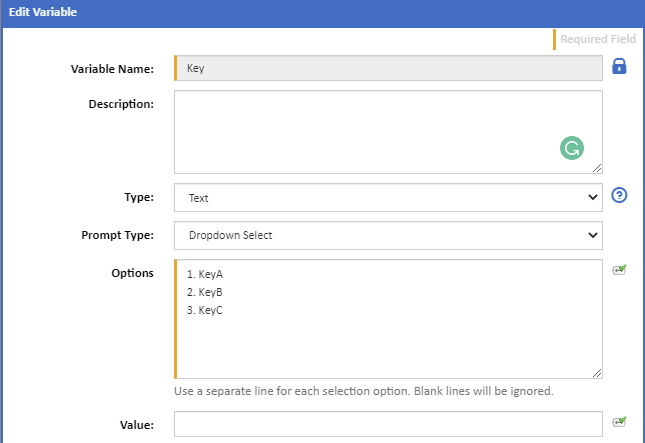
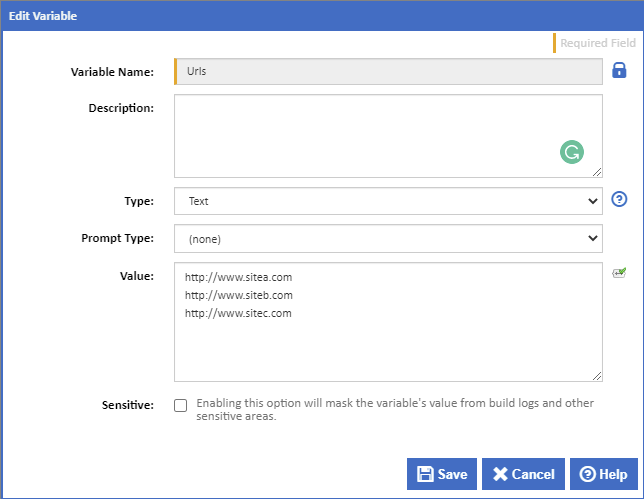
This expression will select a line from the Urls variable matching the value selected for the Key variable:
$Utils.GetString(%Urls%).Split("\n").Item( $Utils.GetString(%Key%).Remove(1).ToNumber().Decrement()$)$
To explain:
$Utils.GetString(%Key%) gets the Key variable to a string that we can work with,
.Remove(1).ToNumber() we then remove all but the first character which is taken as a number,
.Decrement()$ and decremented to a zero based index.
$Utils.GetString(%Urls%) gets the Urls variable to a string that we can work with,
.Split("\n") then splits this string into an array of lines,
.Item( $Utils.GetString(%Key%).Remove(1).ToNumber().Decrement()$)$ and we then select the item from that array for the index generated from the Key variable