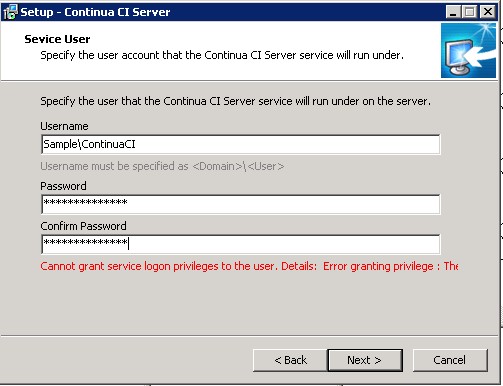
I experienced an issue with ContinuaCI server installation. After running installer and passing steps until “Service User” it works well, but stops with error on this step after clicking “Next >” button. Prerequisites: user exist, I have created it specially for this installation before. Assigned him into Administration group and even assigned this account to “Logon as a service” “User Right Assignment” policy from Control Panel - Administrative Tools - Local Security Policy, because error message was about this and found more detailed error at setup log file at temp folder, but unfortunately it give no impact and installation stuck again.
Tried assign SeServiceLogonRight(also found at the log) using Windows 2003 Resource Kit installed on server, but with no success.
Also noticed that installation stops before sharing display screen, I guess it may be related.
Thanks for the report. I think we have identified the problem (buffer too small). I have uploaded a new build with a small change to the grant tool to fix this:
2014-10-03 14:28:28.353 GrantUserLoginAsServerRights - running C:\Users\ADMINP~1\AppData\Local\Temp\2\is-70BP1.tmp\Grant.exe “Sample\ContinuaCI” SeServiceLogonRight “*****” 2014-10-03 14:28:28.353 Running command “C:\Windows\system32\cmd.exe /C Grant [commandline hidden] > “C:\Users\ADMIN~1\AppData\Local\Temp\2\is-70BP1.tmp\capture.txt” 2>&1” 2014-10-03 14:28:28.525 GrantUserLoginAsServerRights - resultCode 122 2014-10-03 14:28:28.525 GrantUserLoginAsServerRights - output Error granting privilege : The data area passed to a system call is too small
Please contact support@finalbuilder.com so that we can send you a version of the grant.exe tool that has some additional debug logging, that will help us figure out where it is failing.
After some investigation found cause of the problem: computer name was too long(15 characters), after changing name to 8 characters long problem was resolved. Hope this will helps someone else to not spend much time looking for solutions of “Error granting privilege : The data area passed to a system call is too small” error
How did you figure this out? I recall seeing something somewhere about computer name length a while back but it was for NT4 so I though it no longer applied.
I just tried reproduced the same error on Windows 8, setted “computer name” fields with same value as remote server(15 characters length) and created the same login name length(9 characters length) user with admin privileges. The same error for installation appears on Continua CI installation for and even in log file. I then renamed computer back to shorter name(8 characters) and tried installation by the same created admin user(9 characters) and it was completed without any problems. So, as a final step I renamed remote server name(now it was Windows 2012 r2 Datacenter) name to shorter and successfully installed Continua CI server.
Hope it’s okay to resurrect an old thread. I’m having this same issue, trying to create our first build agent.
I’m using the same user that we setup on our domain for our CI server, never had a problem installing server/agent on that box.
The details is cut off “Details: User or password is”, and so far I haven’t been able to locate any more information. I have 2 is- temp folders in my user appdata\local\temp, one containing a .tmp file (binary installer I believe) the other just have Grant.exe and an _isetup folder with _setup64.tmp (app manifest?) and _shfoldr.dll.
Should there be a log file somewhere? Was the issue with server name length resolved? Our CI server has an 11 char name, this agent is 14 chars doesn’t seem that that would be an issue. Nothing in the local event logs regarding authentication failures or the like.
Thanks. I’ve sent the full log. Here’s what I think is the relevent snippet: [code]2018-01-31 08:56:54.864 Password has been provided and confirmed2018-01-31 08:56:54.864 GrantUserLoginAsServerRights - running C:\Users\bkwalker\AppData\Local\Temp\is-13G07.tmp\Grant.exe “drbsystems\devbuilduser” SeServiceLogonRight "*****"2018-01-31 08:56:54.864 Running command "C:\Windows\system32\cmd.exe /C Grant [commandline hidden] > “C:\Users\bkwalker\AppData\Local\Temp\is-13G07.tmp\capture.txt” 2>&1"2018-01-31 08:56:54.927 GrantUserLoginAsServerRights - resultCode 13292018-01-31 08:56:54.927 GrantUserLoginAsServerRights - output User or password is invalid : This user isn’t allowed to sign in to this computer[/code]
I have confirmed that the user already has the log on as a service right in gpedit.msc. I tried removing the user, re-running setup. Same error. Manually added the user back into that right, re-ran installer same error.
This particular use is in the local server administrators group, should have all access necessary already. Is there a way to skip granting?
Ack, I just tried logging in to the server locally, ‘your account is configured to prevent you from using this PC. Please try another PC’. Obviously I need to fix this, suspect that’s the issue.
Found the issue. When we setup the build user on the domain, we set the “Logon Workstations” value for that user. Just needed to add this new agent to that list.