# XML Path - Node not found error
**URL:** https://www.finalbuilder.com/forums/t/xml-path-node-not-found-error/191
**Category:** Discussion
**Created:** [September 7, 2006, 11:09am UTC](https://www.finalbuilder.com/forums/t/xml-path-node-not-found-error/191 "2006-09-07T11:09:56Z")
**Posts on this page:** 20
**Page:** 1
### Author:  [@deleted\_user](https://www.finalbuilder.com/forums/u/deleted_user)
#### Post date: [September 7, 2006, 11:09am UTC](https://www.finalbuilder.com/forums/t/xml-path-node-not-found-error/191/1 "2006-09-07T11:09:56Z")
Finally got our license for FinalBuilder- yay!
I have a problem with a Read XML value to variable action.
What I am doing is querying the database for a list of projects to be built. I iterate over each node in the record set (each node represents a project).
In the node iterator I set a variable META\_XPATH to what the absolute XPath of each node is.
I use the META\_XPATH as the parameter for the Read XML Value to Variable action.
When I have only 1 record (project to build) this works fine. THe META\_XPATH gets set to:
/xml/rs:data/z:row
… and everything works great.
When I have multiple records I run into an error:
XPath returned no node: /xml/rs:data/z:row[0]
So it seems like the XPath that Final builder is defining for me isn’t correct. Is there some additional tweaking I need to do for the XPath (I am brand new to XML)
Thanks,
Owen


---
### Author:  [@angus](https://www.finalbuilder.com/forums/u/angus)
#### Post date: [September 8, 2006, 1:53am UTC](https://www.finalbuilder.com/forums/t/xml-path-node-not-found-error/191/2 "2006-09-08T01:53:01Z")
Hi Owen,
It looks like FinalBuilder thinks you are using MS XML 3 (which indexes xpath statements from 0 by default) and not MSXML 4, although it looks like you are getting MSXML 4 behaviour (as the indexing-from-0 is not working.)
Is it possible that you have MSXML 3 set on the Iterator action but 4 set on “Read from Variable”?
If you go to the “MSXML Parser” tab and explicitly choose “MSXML 4”, how does it work? If the action fails outright, you may need to download and install MSXML 4 or newer.
Regards,
Angus
---
### Author:  [@deleted\_user](https://www.finalbuilder.com/forums/u/deleted_user)
#### Post date: [September 8, 2006, 3:01am UTC](https://www.finalbuilder.com/forums/t/xml-path-node-not-found-error/191/3 "2006-09-08T03:01:11Z")
Angus,
Thanks for the quick response. Both of my actions were set to "Highest available."
I tried setting them both to v4 and, as you said, the package failed outright. I set them both to v3 and got the same result as using highest available.
I will now install MSXML 4 and see what happens.
Owen
---
### Author:  [@deleted\_user](https://www.finalbuilder.com/forums/u/deleted_user)
#### Post date: [September 8, 2006, 3:20am UTC](https://www.finalbuilder.com/forums/t/xml-path-node-not-found-error/191/4 "2006-09-08T03:20:40Z")
Angus,
Installing MSXML4 (sp2) worked. I have everything set to highest available and the package ran fine.
I think I found a bug though - it seems like if I only have MSXML 3 that the node indices should not be set like they are in 4.
Thanks again for the help,
Owen
---
### Author:  [@angus](https://www.finalbuilder.com/forums/u/angus)
#### Post date: [September 11, 2006, 1:53am UTC](https://www.finalbuilder.com/forums/t/xml-path-node-not-found-error/191/5 "2006-09-11T01:53:19Z")
Hi Owen,
That’s very odd. I’ll look into our assumptions about MSXML 3 and see what we can work out.
- Angus
---
### Author:  [@angus](https://www.finalbuilder.com/forums/u/angus)
#### Post date: [September 11, 2006, 2:24am UTC](https://www.finalbuilder.com/forums/t/xml-path-node-not-found-error/191/6 "2006-09-11T02:24:51Z")
Owen,
Turns out it seems we weren’t setting the SelectionLanguage property properly in all cases. I’ve checked in a fix that should restore normal behaviour on MSXML 3. It will be available in the next test build. Working with 4 is probably the best option, though.
Regards,
Angus
---
### Author:  [@nirsilgi](https://www.finalbuilder.com/forums/u/nirsilgi)
#### Post date: [September 11, 2006, 10:52am UTC](https://www.finalbuilder.com/forums/t/xml-path-node-not-found-error/191/7 "2006-09-11T10:52:34Z")
I don’t know which builds are you guys talking about but since I upgraded from build 234 to 283, I encouter some weird problems with Read XML Node actions. Some of them stopped working with ‘Highest available’ and I need to change to XML 3 and some of them still work. This is weird because in all of them it’s the same path pattern.
---
### Author:  [@angus](https://www.finalbuilder.com/forums/u/angus)
#### Post date: [September 12, 2006, 12:57pm UTC](https://www.finalbuilder.com/forums/t/xml-path-node-not-found-error/191/8 "2006-09-12T12:57:19Z")
Hi Owen,
Here’s the new test build: [https://www.finalbuilder.com/downloads/finalbuilder/420/FB420\_285.exe](https://www.finalbuilder.com/downloads/finalbuilder/420/FB420_285.exe)
- Angus
---
### Author:  [@angus](https://www.finalbuilder.com/forums/u/angus)
#### Post date: [September 12, 2006, 12:58pm UTC](https://www.finalbuilder.com/forums/t/xml-path-node-not-found-error/191/9 "2006-09-12T12:58:35Z")
Hi Nir,
The bug which Owen reported isn’t to do with the Read XML Node actions (only to do with generating “absolute” XPaths inside the XPath Iterator.) If you’re having problems with the other XML actions, can you please give us some more details (possibly in a new thread)?
Regards,
Angus
---
### Author:  [@rod\_prdsoftware](https://www.finalbuilder.com/forums/u/rod_prdsoftware)
#### Post date: [September 21, 2006, 2:43am UTC](https://www.finalbuilder.com/forums/t/xml-path-node-not-found-error/191/10 "2006-09-21T02:43:06Z")
I have a similar problem with the XML Node iterator and “Read XML value to variable” actions. It will only work with XML Parser 3. I installed the XML 4 parser SP2 and it didn’t help. I tried installing FB420\_285.exe and it didn’t help either…in fact XML Parser 3 stopped working as well. I reverted back to FB 276 and it works again with XML 3, but no other XML parser option.
Like Owen, I am also using the XML iterator to parse an XML document that is the result of an ADO database recordset.
Let me know how I can help.
Best regards,
Rod.
---
### Author:  [@tate](https://www.finalbuilder.com/forums/u/tate)
#### Post date: [September 21, 2006, 5:26am UTC](https://www.finalbuilder.com/forums/t/xml-path-node-not-found-error/191/11 "2006-09-21T05:26:07Z")
Hi Rod,
Can you send us a FB project (and associated xml file) which shows this behaviour please?
.t8
---
### Author:  [@rod\_prdsoftware](https://www.finalbuilder.com/forums/u/rod_prdsoftware)
#### Post date: [September 21, 2006, 5:55am UTC](https://www.finalbuilder.com/forums/t/xml-path-node-not-found-error/191/12 "2006-09-21T05:55:00Z")
Done. Sent via email to your support. I am using v4.2.0.276
---
### Author:  [@ken\_turner](https://www.finalbuilder.com/forums/u/ken_turner)
#### Post date: [September 21, 2006, 11:39am UTC](https://www.finalbuilder.com/forums/t/xml-path-node-not-found-error/191/13 "2006-09-21T11:39:03Z")
I’ve just been trying to post a reply here but hit two snags:
Owen Manske how did you copy/paste your screenshots?
How do I list some XML text? Presumably also as an image?
---
### Author:  [@deleted\_user](https://www.finalbuilder.com/forums/u/deleted_user)
#### Post date: [September 21, 2006, 3:23am UTC](https://www.finalbuilder.com/forums/t/xml-path-node-not-found-error/191/14 "2006-09-21T03:23:12Z")
Ken,
In windows if you have a window selected and hit Alt+Print Screen, it will just take a snapshot of the selected window and put it in the clipboard. I did that, and then just pasted the image into MS Paint, did a little cropping, and then saved it as a jpg file.
You could either just upload the document that contains the xml text, or copy and paste it into a new text document and upload that. Taking a snapshot and putting it into a jpg would work too.
Hope this helps,
Owen
---
### Author:  [@ken\_turner](https://www.finalbuilder.com/forums/u/ken_turner)
#### Post date: [September 22, 2006, 10:28am UTC](https://www.finalbuilder.com/forums/t/xml-path-node-not-found-error/191/15 "2006-09-22T10:28:14Z")
Thanks, Owen.
I too am new to XML/XPath, and I too am having similar problems.
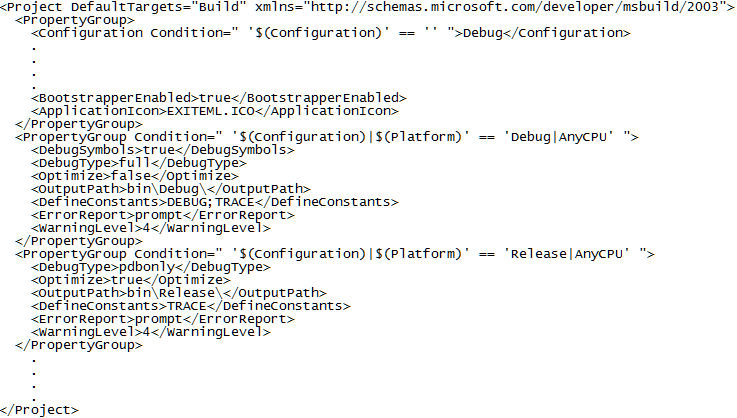
The XML I’m playing with is shown in the first screenshot below; I’m trying to get the value “bin\Release” from the **OutputPath** item in the 3rd **PropertyGroup** section.
I first tried the parameters shown in the second screenshot below; with the **Highest Available** (i.e. MS XML 4) option this gave the error **XPath returned no node : /Project/PropertyGroup/OutputPath** but with the MS XML 3 option returned the value **bin\Debug\, which is what I would expect.**
**I then modified the XPath to Node parameter to read:**
**/Project/PropertyGroup[contains(@Condition, ‘Release’)]/OutputPath**
**With Highest Available I got this error:**
**XPath returned no node : /Project/PropertyGroup[contains(@Condition, ‘Release’)]/OutputPath**
**and with MS XML 3 this error:**
**Error selecting node: Unknown method.
/Project/PropertyGroup[–\>contains(@\<–Condition, ‘Release’)]/OutputPath**
**Can anybody tell me what I’m doing wrong, and what value I need as the XPath?
**
---
### Author:  [@tate](https://www.finalbuilder.com/forums/u/tate)
#### Post date: [September 22, 2006, 1:55am UTC](https://www.finalbuilder.com/forums/t/xml-path-node-not-found-error/191/16 "2006-09-22T01:55:16Z")
I just tried using an online xpath validator, and looks like you’ve got the right syntax. This is what I used:
[http://b-cage.net/code/web/xpath-evaluator.html](http://b-cage.net/code/web/xpath-evaluator.html)
with xml:
a
b
c
and xpath:
/project/propertygroup[contains(@test,‘blah bling blah’)]
will have to look further into this on Monday why it’s not working with msxml.
.t8
---
### Author:  [@deleted\_user](https://www.finalbuilder.com/forums/u/deleted_user)
#### Post date: [September 22, 2006, 8:20am UTC](https://www.finalbuilder.com/forums/t/xml-path-node-not-found-error/191/17 "2006-09-22T08:20:41Z")
Tate,
I’m having the same problem using XPath as the guy above. It seems that none of the functions work. I tried using “contains”, “starts-with”, “ends-with”, etc. Is this a bug?
Here’s an example:
/Project/ItemGroup/Reference[contains(@Include, ‘nGoCtrls’)]
XPath evaluation failed : Unknown method.
/Project/ItemGroup/Reference[–\>contains(@\<–Include, ‘nGoCtrls’)]
Thanks,
Dan
---
### Author:  [@tate](https://www.finalbuilder.com/forums/u/tate)
#### Post date: [September 25, 2006, 2:27am UTC](https://www.finalbuilder.com/forums/t/xml-path-node-not-found-error/191/18 "2006-09-25T02:27:36Z")
I just tried this with FinalBuilder (with both MSXML3 and MSXML4) and it worked fine.
This is the xml file:
```
< xml>< test attrib=“zaz”>a< /test>< test attrib=“i bz”>b< /test>< test attrib=“c kk”>c< /test>< /xml>
```
[extra spaces only so that the tags don’t get ignored by the html rendering]
And in a XML Read XML Value to Variable action:
/xml/test[contains(@attrib, ‘b’)]
FinalBuilder simply passes the xpath query through to the MSXML parser, so any error you’re seeing is probably due to the parser. Try downloading the latest MSXML parser and see if that solves the problem. Also, what version of FinalBuilder are you using and which Operating System?
[http://www.microsoft.com/downloads/details.aspx?FamilyID=3144b72b-b4f2-46da-b4b6-c5d7485f2b42&DisplayLang=en](http://www.microsoft.com/downloads/details.aspx?FamilyID=3144b72b-b4f2-46da-b4b6-c5d7485f2b42&DisplayLang=en)
(or search for MSXML4 download)
.t8
---
### Author:  [@ken\_turner](https://www.finalbuilder.com/forums/u/ken_turner)
#### Post date: [September 25, 2006, 8:35am UTC](https://www.finalbuilder.com/forums/t/xml-path-node-not-found-error/191/19 "2006-09-25T08:35:18Z")
Tate:
\> Try downloading the latest MSXML parser and see if that solves the problem.
I’m already using MSXML 4.0 SP2 - I think that’s about as late as you can get.
\> what version of FinalBuilder are you using
4.2.0.276; I gather your latest test build is 293 - shall I try it with that?
\> and which Operating System?
XP Pro SP2
In passing, I have also tried using the same XPath independently of FinalBuilder, using a simple standalone VBScript. It also fails.
---
### Author:  [@tate](https://www.finalbuilder.com/forums/u/tate)
#### Post date: [September 25, 2006, 9:20am UTC](https://www.finalbuilder.com/forums/t/xml-path-node-not-found-error/191/20 "2006-09-25T09:20:44Z")
Hi Ken,
\> 4.2.0.276; I gather your latest test build is 293 - shall I try it with that?
I’m pretty sure no changes where made for the xml actions between those versions, but I spose it doesn’t hurt to try.
\> In passing, I have also tried using the same XPath independently of FinalBuilder, using a simple standalone VBScript. It also fails.
Ok, this is a big clue… which means it’s probably something to do with msxml instead of FinalBuilder. I’m running out of ideas as to what could be the problem. Have you got any other PC’s that you could test with? Could you send me your xml file and FB project and I’ll see if your test case works here.
cheers,
.t8
[Next page](https://www.finalbuilder.com/forums/t/xml-path-node-not-found-error/191.md?page=2)