# What is the correct way to execute a .bat/.cmd file with parameters?
**URL:** https://www.finalbuilder.com/forums/t/what-is-the-correct-way-to-execute-a-bat-cmd-file-with-parameters/6697
**Category:** Discussion
**Created:** [January 17, 2020, 9:23am UTC](https://www.finalbuilder.com/forums/t/what-is-the-correct-way-to-execute-a-bat-cmd-file-with-parameters/6697 "2020-01-17T09:23:28Z")
**Posts on this page:** 2
**Page:** 1
### Author:  [@kay.zumbusch](https://www.finalbuilder.com/forums/u/kay.zumbusch)
#### Post date: [January 17, 2020, 9:23am UTC](https://www.finalbuilder.com/forums/t/what-is-the-correct-way-to-execute-a-bat-cmd-file-with-parameters/6697/1 "2020-01-17T09:23:28Z")
Hi,
I’m looking for the correct way to run a .bat/.cmd file with parameters in ContinuaCI. The file accepts four parameters and is stored on a Linux network share with the executable bit not set. Therefor Windows does not allow to execute the file directly and I cannot use the “Execute Program” task with the .bat/.cmd file as the application.
The next thing I tried was the “Execute Program” task with “cmd.exe” as the application and although cmd.exe is directly accessible via the PATH environment variable, ContinuaCI checks if a cmd.exe is available in the working directory.
As ContinuaCI provides a “Run DOS Command / Batch File” task I tried that, but the are no options to provide parameters to the batch file and they can’t be included in the path to the batch file.
So, how do I run a parameterized .bat/.cmd file from ContinuaCI?
With kind regards
Kay Zumbusch
---
### Author:  [@Sparky](https://www.finalbuilder.com/forums/u/Sparky)
#### Post date: [January 19, 2020, 12:45pm UTC](https://www.finalbuilder.com/forums/t/what-is-the-correct-way-to-execute-a-bat-cmd-file-with-parameters/6697/2 "2020-01-19T12:45:56Z")
Hi Kay,
You can include parameters in the “Command or Batch File” field of the “Run DOS Command / Batch File” action.
e.g.
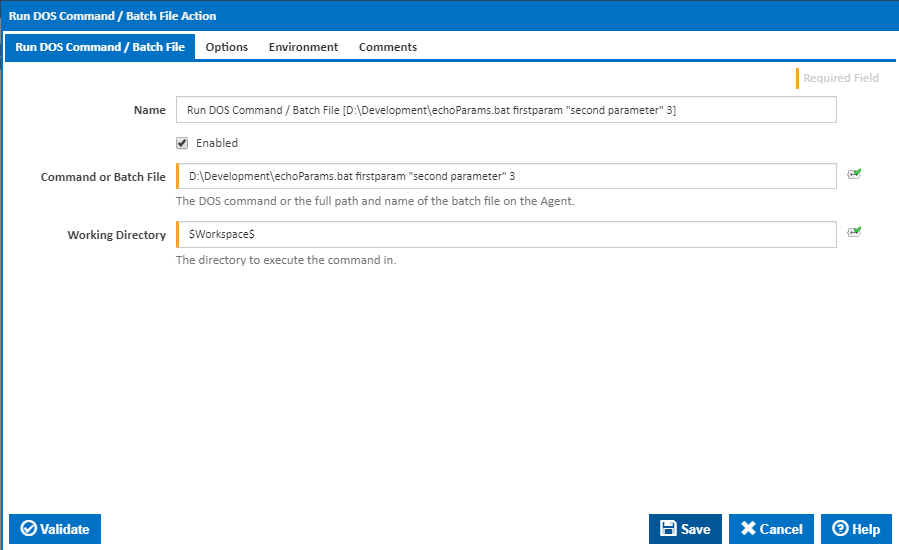
The batch file “echoParams.bat” contains the following lines:
```auto
@echo parameter1=%1
@echo parameter2=%2
@echo parameter3=%3
```
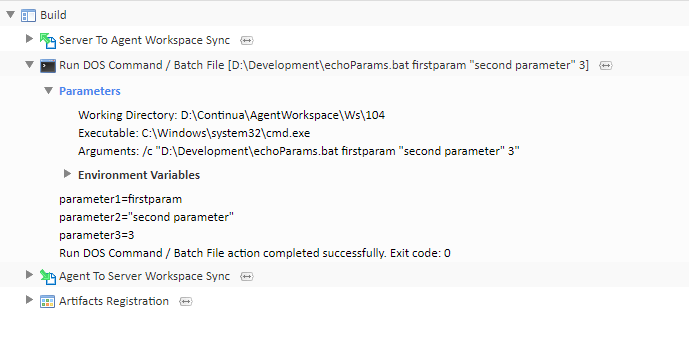
The build log shows the output as follows: