# Variable dictionary / map? populate value based on selected keys in form?
**URL:** https://www.finalbuilder.com/forums/t/variable-dictionary-map-populate-value-based-on-selected-keys-in-form/6994
**Category:** Feature Requests
**Tags:** implemented
**Created:** [March 3, 2021, 11:56am UTC](https://www.finalbuilder.com/forums/t/variable-dictionary-map-populate-value-based-on-selected-keys-in-form/6994 "2021-03-03T11:56:42Z")
**Posts on this page:** 2
**Page:** 1
### Author:  [@ktopaz](https://www.finalbuilder.com/forums/u/ktopaz)
#### Post date: [March 3, 2021, 11:56am UTC](https://www.finalbuilder.com/forums/t/variable-dictionary-map-populate-value-based-on-selected-keys-in-form/6994/1 "2021-03-03T11:56:42Z")
Hi Guys,
I’m trying to create a mechanism that will allow developers running builds to select from multipole chat channels to send messages to to.
the chat channel webhook URLs are to be stored in a global variable or multiple variables.
The configurations have a form prompt variable that allows selecting from multiple channels (keys)
I need some way to translate the selected keys to the URLS I have stored in global variable(s)
Is that somehow possible within Continua CI?
Thanks!
---
### Author:  [@Sparky](https://www.finalbuilder.com/forums/u/Sparky)
#### Post date: [March 4, 2021, 5:30am UTC](https://www.finalbuilder.com/forums/t/variable-dictionary-map-populate-value-based-on-selected-keys-in-form/6994/2 "2021-03-04T05:30:33Z")
Hi @ktopaz,
We are planning to add a new field to `Dropdown Selection` variable prompt so that you can specify labels and values. This will allow the use to select a label, e.g. the channel name, but the variable gets set to another value, e.g. the channel URL or a variable which expands to the channel URL.
Meanwhile, there are a couple of options:
1. Use `If` and `Else` actions along with `Set Variable` actions to set a new variable based on the value of the key variable e.g.
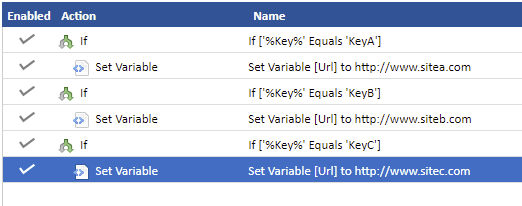
1. Add a number to the start of each of the keys and use this number to select a item from a list in another variable. e.g.
With the following variables:
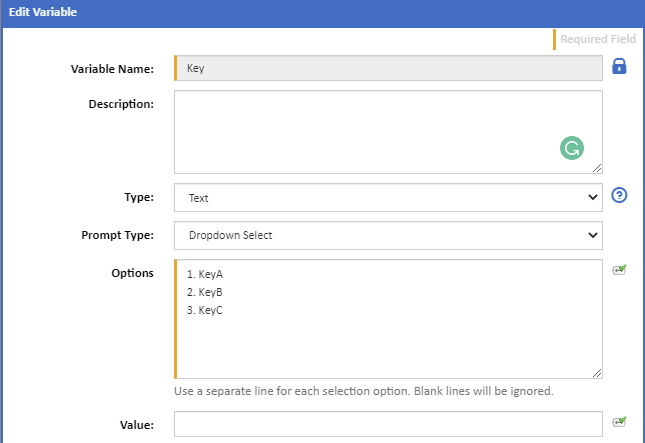
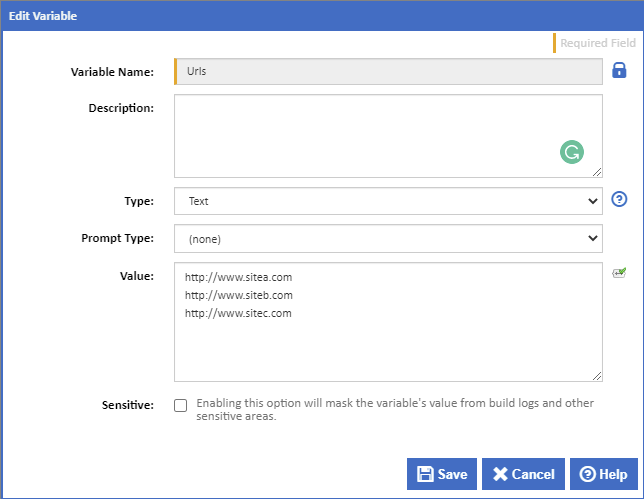
This expression will select a line from the `Urls` variable matching the value selected for the `Key` variable:
```auto
$Utils.GetString(%Urls%).Split("\n").Item( $Utils.GetString(%Key%).Remove(1).ToNumber().Decrement()$)$
```
To explain:
`$Utils.GetString(%Key%)` gets the Key variable to a string that we can work with,
`.Remove(1).ToNumber()` we then remove all but the first character which is taken as a number,
`.Decrement()$` and decremented to a zero based index.
`$Utils.GetString(%Urls%)` gets the Urls variable to a string that we can work with,
`.Split("\n")` then splits this string into an array of lines,
`.Item( $Utils.GetString(%Key%).Remove(1).ToNumber().Decrement()$)$` and we then select the item from that array for the index generated from the Key variable