# Using Custom Log Messages to Register Unit Test Results
**URL:** https://www.finalbuilder.com/forums/t/using-custom-log-messages-to-register-unit-test-results/7202
**Category:** Discussion
**Created:** [March 28, 2022, 7:42pm UTC](https://www.finalbuilder.com/forums/t/using-custom-log-messages-to-register-unit-test-results/7202 "2022-03-28T19:42:42Z")
**Posts on this page:** 7
**Page:** 1
### Author:  [@fanuth](https://www.finalbuilder.com/forums/u/fanuth)
#### Post date: [March 28, 2022, 7:42pm UTC](https://www.finalbuilder.com/forums/t/using-custom-log-messages-to-register-unit-test-results/7202/1 "2022-03-28T19:42:42Z")
I am currently trying to figure out how to register the unit tests, run by a Finalbuilder script, at the Continua build.
The easiest solution for me was to pass the workspace path down to the Finalbuilder script and make it copy the .trx files to the workspace. After the Finalbuilder script has finished, the tests are being registered by the Import MSTest action.
This solution works great so far. But in order to implement it with all our projects, we would need to adjust every configuration in Continua which is less than ideal.
I read about the latest changes in version 1.9.2.832, installed it right away and tried to assemble the command to import the test results with the help of custom log messages.

But Continua does not seem to care about the log message. Do I have to use a special Action inside Finalbuilder to actually make use of this feature?
Usually it does note that the import is successful, or if there were some errors, it would log that too. I feel like Continua simply does not register the command.
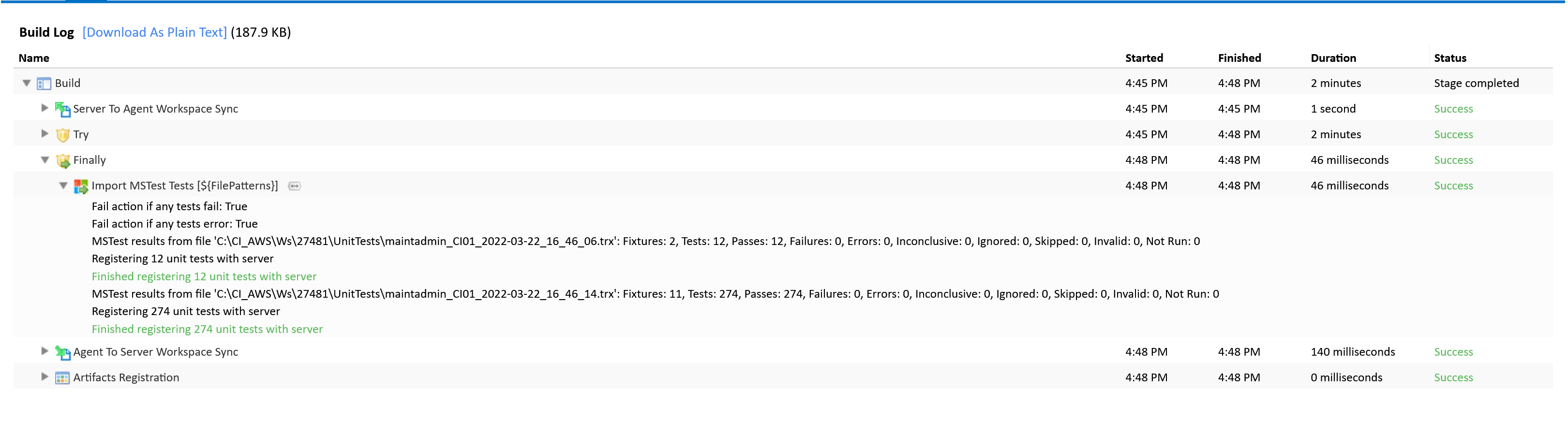
How des the Custom Log Message work? Will it execute after the Finalbuilder Script has finished? Or does it execute in the meantime.
Right now, the Finalbuilder Script is configured to run in a temporary directory which gets deleted when the build process itself has completed.
---
### Author:  [@Sparky](https://www.finalbuilder.com/forums/u/Sparky)
#### Post date: [March 28, 2022, 10:14pm UTC](https://www.finalbuilder.com/forums/t/using-custom-log-messages-to-register-unit-test-results/7202/2 "2022-03-28T22:14:41Z")
Hi @fanuth,
In your build log, it shows the `type` parameter for your custom log message as `'msbuild'`. This is not a [supported type](https://wiki.finalbuilder.com/display/continua/Custom+Log+Messages#:~:text=type%3A%20one%20of%20junit%2C%20mstest%2C%20nunit%20or%20xunit.%20identifies%20the%20type%20of%20unit%20test%20runner%20that%20created%20the%20results%20file.%20this%20is%20required.). In your case this should be `'mstest'`.
Note also, that we would recommend locating your test result files within the build workspace so that you don’t get conflicts if running more than one build concurrently.
---
### Author:  [@fanuth](https://www.finalbuilder.com/forums/u/fanuth)
#### Post date: [March 29, 2022, 7:28am UTC](https://www.finalbuilder.com/forums/t/using-custom-log-messages-to-register-unit-test-results/7202/3 "2022-03-29T07:28:26Z")
Hey thanks for your quick response!
> [@Sparky](#):
>
> In your case this should be `'mstest'`.
Damn a typo… Well now that its fixed, the tests still wont get registered. I tried running the command right after each test library with the exact filename. Still no unit tests registered inside the build. Any clue what could be the error?
```auto
@@continua[importUnitTestResults type='mstest' filePatterns='C:\Temp\fbbuild\license_hive\132\WC\CES.LicenseHive.Core.Tests\TestResults\maintadmin_CI01_2022-03-29_08_34_54.trx' failIfTestFails='false' failIfTestErrors='false' quiet='false' verbose='false']
```
* * *
> [@Sparky](#):
>
> Note also, that we would recommend locating your test result files within the build workspace so that you don’t get conflicts if running more than one build concurrently.
Yes, I’ve wanted to move all the builds inside the workspace for a long time now. But it would require me to modify all the Finalbuilder Scripts for all our projects which is quite scary for now :S
Additionally, the way the builds run right now usually don’t produce any conflicts. We are generating a directory for each run with the revision number.
---
### Author:  [@Sparky](https://www.finalbuilder.com/forums/u/Sparky)
#### Post date: [March 29, 2022, 7:40am UTC](https://www.finalbuilder.com/forums/t/using-custom-log-messages-to-register-unit-test-results/7202/4 "2022-03-29T07:40:52Z")
Hi @fanuth,
Can you try setting the `verbose` parameter to ‘true’ and then post the build log output?
---
### Author:  [@fanuth](https://www.finalbuilder.com/forums/u/fanuth)
#### Post date: [March 29, 2022, 8:30am UTC](https://www.finalbuilder.com/forums/t/using-custom-log-messages-to-register-unit-test-results/7202/5 "2022-03-29T08:30:10Z")
I attached the build log as requested. I cut out some parts and added comments in these places.
[build log.txt](https://www.finalbuilder.com/forums/uploads/short-url/3Z7yFV0AcEl3xmhlIVDbPEarwNK.txt) (8.7 KB)
One additional note: When using Finalbuilders Action dotnet Test, I can not set the logger field without the program writing the same value into the Configuration field after clicking OK. When I open the dialog again, the value is set in both fields which is not ideal. Thats why im calling the dotnet command manually.
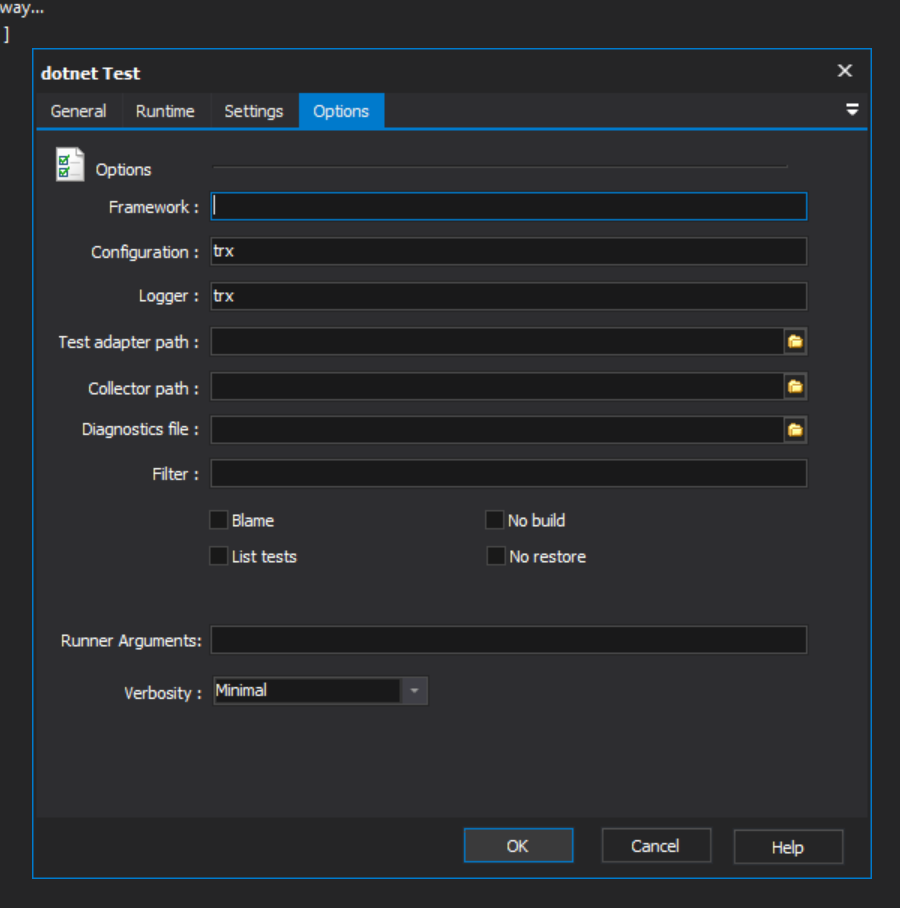
Same goes for the Publish command. Maybe updating to the newest version will help. I’m currently running 8.0.0.3040.
---
### Author:  [@Sparky](https://www.finalbuilder.com/forums/u/Sparky)
#### Post date: [March 29, 2022, 11:41am UTC](https://www.finalbuilder.com/forums/t/using-custom-log-messages-to-register-unit-test-results/7202/6 "2022-03-29T11:41:01Z")
Hi @fanuth,
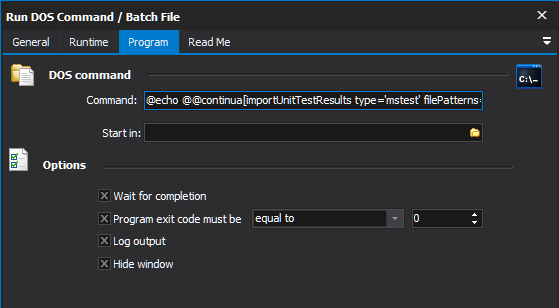
What FinalBuilder action are you using to send the log message. You can’t use the “Continua CI - Log Message” action as this is specifically for logging the message verbatim. e.g. it outputs a `@@continua[message value='...']` message to Continua CI.
We don’t yet have a FinalBuilder action specifically for sending any custom log messages but we plan to add this for the next version. Meanwhile your best bet is to choose a scripting or batch execution action with a command that outputs text. You can, for example, enter an `echo` command as the Command for a Run DOS Command / Batch File action.
I can confirm that the issue with the Dotnet Test action exists in the latest version - we’ll look into that further tomorrow. The Dotnet Publish action does not have a Logger - maybe it’s happening with another field?
---
### Author:  [@fanuth](https://www.finalbuilder.com/forums/u/fanuth)
#### Post date: [March 29, 2022, 12:48pm UTC](https://www.finalbuilder.com/forums/t/using-custom-log-messages-to-register-unit-test-results/7202/7 "2022-03-29T12:48:20Z")
> [@Sparky](#):
>
> Continua CI - Log Message
This was the action I was using. I switched as you recommended and now it works as expected - nice 😃
* * *
I’ll create a [new Post](https://www.finalbuilder.com/forums/t/7203) in the Finalbuilder / Bugs Topic for the bugs I have encountered for the dotnet Finalbuilder Action.