# Unable to process file located on another server
**URL:** https://www.finalbuilder.com/forums/t/unable-to-process-file-located-on-another-server/6408
**Category:** Discussion
**Tags:** automise
**Created:** [January 31, 2019, 11:14am UTC](https://www.finalbuilder.com/forums/t/unable-to-process-file-located-on-another-server/6408 "2019-01-31T11:14:10Z")
**Posts on this page:** 2
**Page:** 1
### Author:  [@asadasing](https://www.finalbuilder.com/forums/u/asadasing)
#### Post date: [January 31, 2019, 11:14am UTC](https://www.finalbuilder.com/forums/t/unable-to-process-file-located-on-another-server/6408/1 "2019-01-31T11:14:10Z")
Hello guys,
I am encountering an issue with automise 3 job which is task scheduled on server A
- Job Automise is installed on server A
- The file to be processed is located in serveur B
- The is a map Drive in server A connected to B name Q:\
- The component i have used is: Map Network Drive. (Persistent Mapping checked)
When i run it manually, it works but the automated task fail for certain reason.
Please find attached the screen shot
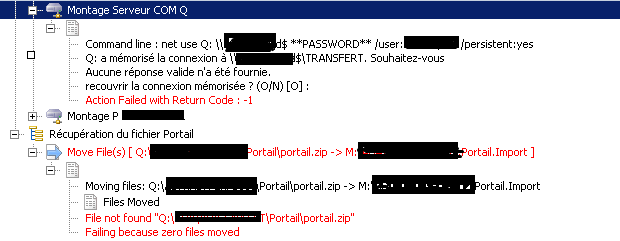
The file is present on the specified server directory but final error indicated that the file is not present.
Can you help to solve this issue please?
Best regards,
Duke
---
### Author:  [@Vincent](https://www.finalbuilder.com/forums/u/Vincent)
#### Post date: [January 31, 2019, 12:37pm UTC](https://www.finalbuilder.com/forums/t/unable-to-process-file-located-on-another-server/6408/2 "2019-01-31T12:37:31Z")
This is most likely a permissions issue. Try setting the task to run with the highest privileges - not sure if that was available in Automise 3 - if not you will need to edit the schedule via windows scheduled tasks.