# Tf history behavior change since FB6/TFS2013
**URL:** https://www.finalbuilder.com/forums/t/tf-history-behavior-change-since-fb6-tfs2013/6928
**Category:** Bugs
**Created:** [November 17, 2020, 5:22pm UTC](https://www.finalbuilder.com/forums/t/tf-history-behavior-change-since-fb6-tfs2013/6928 "2020-11-17T17:22:54Z")
**Posts on this page:** 8
**Page:** 1
### Author:  [@cdaniel](https://www.finalbuilder.com/forums/u/cdaniel)
#### Post date: [November 17, 2020, 5:22pm UTC](https://www.finalbuilder.com/forums/t/tf-history-behavior-change-since-fb6-tfs2013/6928/1 "2020-11-17T17:22:54Z")
I’m not sure this is a bug, but something’s changed. As a part of a much larger build script, I have a Team Foundation version history action.
I’m getting an error from tf.exe that it’s unable to determine the workspace.
In testing with tf.exe in a command prompt, I can repro this behavior by running the tool from a current directory that’s not mapped to a source control folder. The error occurs even through the command line doesn’t reference any local path. It’s of the form:
tf history $/Development/blah/blah/blah /recursive /stopafter:1 /noprompt /version:Wworkspace;owner
I suspect this is a tfs behavior change between tfs 2013 and tfs 2018, but I know I’m not going to get msft to make a change to help me 🙂
One thought: an option on the tf history command to set the current directory in which the command is run would probably do the trick. Is there a way to do this from the before script maybe?
---
### Author:  [@cdaniel](https://www.finalbuilder.com/forums/u/cdaniel)
#### Post date: [November 17, 2020, 6:24pm UTC](https://www.finalbuilder.com/forums/t/tf-history-behavior-change-since-fb6-tfs2013/6928/2 "2020-11-17T18:24:31Z")
Looks like an option to supply the /collection command line option, or a simple box to supply additional command line options would also do the trick.
---
### Author:  [@cdaniel](https://www.finalbuilder.com/forums/u/cdaniel)
#### Post date: [November 17, 2020, 7:03pm UTC](https://www.finalbuilder.com/forums/t/tf-history-behavior-change-since-fb6-tfs2013/6928/3 "2020-11-17T19:03:40Z")
I was able to proceed by putting T" "/collection:%Teamserver% into the Version box on the action options. Cheesy, but it got the job done.
I’m still not sure what changed here - this had been working for years on FB6 and TFS 2013, but today I can’t make it work “the old way” even using tf.exe from 2013.
---
### Author:  [@Vincent](https://www.finalbuilder.com/forums/u/Vincent)
#### Post date: [November 17, 2020, 9:22pm UTC](https://www.finalbuilder.com/forums/t/tf-history-behavior-change-since-fb6-tfs2013/6928/4 "2020-11-17T21:22:33Z")
Hi Carl
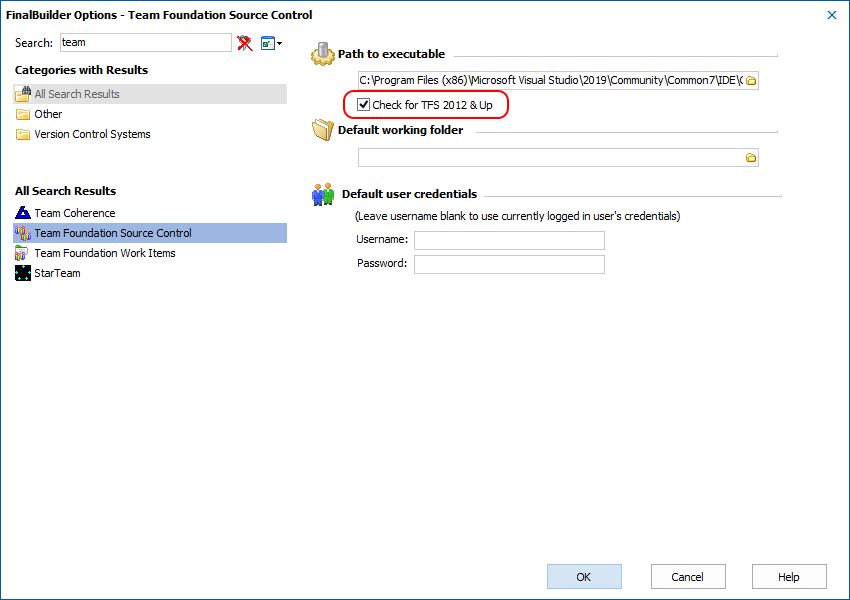
In the FinalBuilder options, there is a checkbox for TFS 2012 & up - that needs to be checked for TFS2013.
---
### Author:  [@cdaniel](https://www.finalbuilder.com/forums/u/cdaniel)
#### Post date: [November 17, 2020, 10:10pm UTC](https://www.finalbuilder.com/forums/t/tf-history-behavior-change-since-fb6-tfs2013/6928/5 "2020-11-17T22:10:51Z")
Checking the checkbox didn’t make any difference, but filling in the default working folder did. I’m on TFS 2018 now, moving from TFS 2013, but it looks like I had FB6 running tf.exe from VS 2010.
Anyway, it’s all sorted now - thanks for the pointer. I looked at that dialog many times and didn’t see what was right in front of my eyes…
---
### Author:  [@Vincent](https://www.finalbuilder.com/forums/u/Vincent)
#### Post date: [November 17, 2020, 10:41pm UTC](https://www.finalbuilder.com/forums/t/tf-history-behavior-change-since-fb6-tfs2013/6928/6 "2020-11-17T22:41:21Z")
Looking at the code I can see this is an oversight on our part, the History action should (like most of the other TF actions) allow you to specify the workspace folder.
I have added this option and will upload a build with that change shortly (building now).
---
### Author:  [@Vincent](https://www.finalbuilder.com/forums/u/Vincent)
#### Post date: [November 17, 2020, 11:26pm UTC](https://www.finalbuilder.com/forums/t/tf-history-behavior-change-since-fb6-tfs2013/6928/7 "2020-11-17T23:26:23Z")
This build has the change to the history action
[https://downloads.finalbuilder.com/downloads/finalbuilder/800/FB800\_2944.exe](https://downloads.finalbuilder.com/downloads/finalbuilder/800/FB800_2944.exe)
---
### Author:  [@cdaniel](https://www.finalbuilder.com/forums/u/cdaniel)
#### Post date: [November 18, 2020, 4:18pm UTC](https://www.finalbuilder.com/forums/t/tf-history-behavior-change-since-fb6-tfs2013/6928/8 "2020-11-18T16:18:41Z")
Thanks, Vincent! You guys rock. Seriously - I’ve been using FinalBuilder for years and years (since FB3?) and I couldn’t ask for a better vendor relationship - not to mention a great product.