# Setup - Continua CI Server - Service User - Cannot grant service logon privileges to the user
**URL:** https://www.finalbuilder.com/forums/t/setup-continua-ci-server-service-user-cannot-grant-service-logon-privileges-to-the-user/5694
**Category:** Discussion
**Created:** [October 2, 2014, 6:38am UTC](https://www.finalbuilder.com/forums/t/setup-continua-ci-server-service-user-cannot-grant-service-logon-privileges-to-the-user/5694 "2014-10-02T06:38:37Z")
**Posts on this page:** 15
**Page:** 1
### Author:  [@volodymyr](https://www.finalbuilder.com/forums/u/volodymyr)
#### Post date: [October 2, 2014, 6:38am UTC](https://www.finalbuilder.com/forums/t/setup-continua-ci-server-service-user-cannot-grant-service-logon-privileges-to-the-user/5694/1 "2014-10-02T06:38:37Z")
Hi,
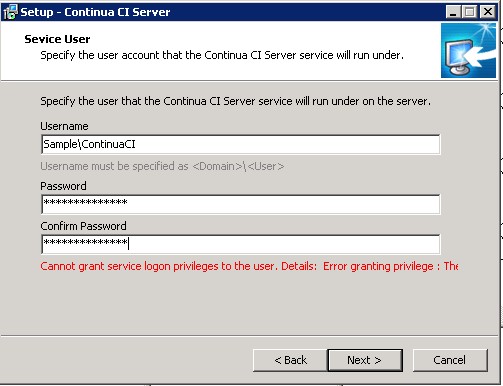
I experienced an issue with ContinuaCI server installation. After running installer and passing steps until “Service User” it works well, but stops with error on this step after clicking “Next \>” button.
Prerequisites: user exist, I have created it specially for this installation before. Assigned him into Administration group and even assigned this account to “Logon as a service” “User Right Assignment” policy from Control Panel - Administrative Tools - Local Security Policy, because error message was about this and found more detailed error at setup log file at temp folder, but unfortunately it give no impact and installation stuck again.
Tried assign SeServiceLogonRight(also found at the log) using Windows 2003 Resource Kit installed on server, but with no success.
Also noticed that installation stops before sharing display screen, I guess it may be related.
OS: Windows Server 2008 R2 Datacenter SP 2
Installer version: ContinuaCI.Server.Setup\_x64\_1.5.0.295.exe
Log output:
2014-10-01 19:54:04.014 Log opened. (Time zone: UTC+00:00)
2014-10-01 19:54:04.014 Setup version: Inno Setup version 5.5.4 (u)
2014-10-01 19:54:04.014 Original Setup EXE: C:\Users\ADMIN\Desktop\ContinuaCI.Server.Setup\_x64\_1.5.0.295.exe
2014-10-01 19:54:04.014 Setup command line: /SL5="$C012C,48295046,119296,C:\Users\ADMIN\Desktop\ContinuaCI.Server.Setup\_x64\_1.5.0.295.exe"
2014-10-01 19:54:04.014 Windows version: 6.1.7601 SP1 (NT platform: Yes)
2014-10-01 19:54:04.014 64-bit Windows: Yes
2014-10-01 19:54:04.014 Processor architecture: x64
2014-10-01 19:54:04.014 User privileges: Administrative
2014-10-01 19:54:04.045 64-bit install mode: Yes
2014-10-01 19:54:04.045 Created temporary directory: C:\Users\ADMIN~1\AppData\Local\Temp\2\is-JCBQR.tmp
2014-10-01 19:54:04.139 Extracting temporary file: C:\Users\ADMIN~1\AppData\Local\Temp\2\is-JCBQR.tmp\ISGetObj.dll
2014-10-01 19:54:04.186 \>\> InitializeSetup - Enter
2014-10-01 19:54:04.186 Extracting temporary file: C:\Users\ADMIN~1\AppData\Local\Temp\2\is-JCBQR.tmp\Cross.bmp
2014-10-01 19:54:04.201 Extracting temporary file: C:\Users\ADMIN~1\AppData\Local\Temp\2\is-JCBQR.tmp\Tick.bmp
2014-10-01 19:54:04.201 Extracting temporary file: C:\Users\ADMIN~1\AppData\Local\Temp\2\is-JCBQR.tmp\Grant.exe
2014-10-01 19:54:04.217 \>\> InitializeSetup - Exit
2014-10-01 19:54:04.311 \>\> InitializeWizard - Enter
2014-10-01 19:54:04.326 \>\> InitializeWizard - Exit
2014-10-01 19:54:05.998 \>\> IISCheckInstalledModules - Enter
2014-10-01 19:54:05.998 \>\> IIS7CheckInstalledModules - Enter
2014-10-01 19:54:05.998 ASPNET = 1
2014-10-01 19:54:06.154 IISWindowsAuthInstalled = true
2014-10-01 19:54:06.154 \<\< IIS7CheckInstalledModules - Exit
2014-10-01 19:54:06.154 \<\< IISCheckInstalledModules - Exit
2014-10-01 19:56:16.510 GrantUserLoginAsServerRights - running C:\Users\ADMIN~1\AppData\Local\Temp\2\is-JCBQR.tmp\Grant.exe “Sample\ContinuaCI” SeServiceLogonRight "\*\*\*\*\*"
2014-10-01 19:56:16.510 Running command "C:\Windows\system32\cmd.exe /C Grant [commandline hidden] \> “C:\Users\ADMIN~1\AppData\Local\Temp\2\is-JCBQR.tmp\capture.txt” 2\>&1"
2014-10-01 19:56:16.557 GrantUserLoginAsServerRights - resultCode 122
2014-10-01 19:56:16.557 GrantUserLoginAsServerRights - output Error granting privilege : The data area passed to a system call is too small
Attached file with error.
Could you please advice any solution?
Thanks,
Vova
---
### Author:  [@Vincent](https://www.finalbuilder.com/forums/u/Vincent)
#### Post date: [October 3, 2014, 2:50am UTC](https://www.finalbuilder.com/forums/t/setup-continua-ci-server-service-user-cannot-grant-service-logon-privileges-to-the-user/5694/2 "2014-10-03T02:50:10Z")
Hi Vova
Thanks for the report. I think we have identified the problem (buffer too small). I have uploaded a new build with a small change to the grant tool to fix this:
[http://downloads.finalbuilder.com/downloads/continua/1.5/ContinuaCI.Server.Setup\_x64\_1.5.0.321.exe](http://downloads.finalbuilder.com/downloads/continua/1.5/ContinuaCI.Server.Setup_x64_1.5.0.321.exe)
[http://downloads.finalbuilder.com/downloads/continua/1.5/ContinuaCI.Server.Setup\_1.5.0.321.exe](http://downloads.finalbuilder.com/downloads/continua/1.5/ContinuaCI.Server.Setup_1.5.0.321.exe)
[http://downloads.finalbuilder.com/downloads/continua/1.5/ContinuaCI.Agent.Setup\_x64\_1.5.0.321.exe](http://downloads.finalbuilder.com/downloads/continua/1.5/ContinuaCI.Agent.Setup_x64_1.5.0.321.exe)
[http://downloads.finalbuilder.com/downloads/continua/1.5/ContinuaCI.Agent.Setup\_1.5.0.321.exe](http://downloads.finalbuilder.com/downloads/continua/1.5/ContinuaCI.Agent.Setup_1.5.0.321.exe)
This build is the same as the release version, with just the change to the installer/grant.exe.
---
### Author:  [@volodymyr](https://www.finalbuilder.com/forums/u/volodymyr)
#### Post date: [October 3, 2014, 4:40am UTC](https://www.finalbuilder.com/forums/t/setup-continua-ci-server-service-user-cannot-grant-service-logon-privileges-to-the-user/5694/3 "2014-10-03T04:40:05Z")
Hi Vincent,
Thanks for quick reply, but still have no success even with provided by you new installer:
[http://downloads.finalbuilder.com/downloads/continua/1.5/ContinuaCI.Server.Setup\_x64\_1.5.0.321.exe](http://downloads.finalbuilder.com/downloads/continua/1.5/ContinuaCI.Server.Setup_x64_1.5.0.321.exe)
Log output is still the same:
2014-10-03 14:28:28.353 GrantUserLoginAsServerRights - running C:\Users\ADMINP~1\AppData\Local\Temp\2\is-70BP1.tmp\Grant.exe “Sample\ContinuaCI” SeServiceLogonRight “\*\*\*\*\*”
2014-10-03 14:28:28.353 Running command “C:\Windows\system32\cmd.exe /C Grant [commandline hidden] \> “C:\Users\ADMIN~1\AppData\Local\Temp\2\is-70BP1.tmp\capture.txt” 2\>&1”
2014-10-03 14:28:28.525 GrantUserLoginAsServerRights - resultCode 122
2014-10-03 14:28:28.525 GrantUserLoginAsServerRights - output Error granting privilege : The data area passed to a system call is too small
All prerequisites are the same.
Regards,
Vova
---
### Author:  [@Vincent](https://www.finalbuilder.com/forums/u/Vincent)
#### Post date: [October 4, 2014, 3:57am UTC](https://www.finalbuilder.com/forums/t/setup-continua-ci-server-service-user-cannot-grant-service-logon-privileges-to-the-user/5694/4 "2014-10-04T03:57:15Z")
Hi Vova
Please contact [support@finalbuilder.com](mailto:support@finalbuilder.com) so that we can send you a version of the grant.exe tool that has some additional debug logging, that will help us figure out where it is failing.
---
### Author:  [@volodymyr](https://www.finalbuilder.com/forums/u/volodymyr)
#### Post date: [October 12, 2014, 4:07am UTC](https://www.finalbuilder.com/forums/t/setup-continua-ci-server-service-user-cannot-grant-service-logon-privileges-to-the-user/5694/5 "2014-10-12T04:07:23Z")
After some investigation found cause of the problem: computer name was too long(15 characters), after changing name to 8 characters long problem was resolved. Hope this will helps someone else to not spend much time looking for solutions of “Error granting privilege : The data area passed to a system call is too small” error
---
### Author:  [@Vincent](https://www.finalbuilder.com/forums/u/Vincent)
#### Post date: [October 12, 2014, 10:54am UTC](https://www.finalbuilder.com/forums/t/setup-continua-ci-server-service-user-cannot-grant-service-logon-privileges-to-the-user/5694/6 "2014-10-12T10:54:01Z")
Hi Vova
How did you figure this out? I recall seeing something somewhere about computer name length a while back but it was for NT4 so I though it no longer applied.
---
### Author:  [@volodymyr](https://www.finalbuilder.com/forums/u/volodymyr)
#### Post date: [October 13, 2014, 11:08am UTC](https://www.finalbuilder.com/forums/t/setup-continua-ci-server-service-user-cannot-grant-service-logon-privileges-to-the-user/5694/7 "2014-10-13T11:08:36Z")
Hi Vincent,
I just tried reproduced the same error on Windows 8, setted “computer name” fields with same value as remote server(15 characters length) and created the same login name length(9 characters length) user with admin privileges. The same error for installation appears on Continua CI installation for and even in log file. I then renamed computer back to shorter name(8 characters) and tried installation by the same created admin user(9 characters) and it was completed without any problems. So, as a final step I renamed remote server name(now it was Windows 2012 r2 Datacenter) name to shorter and successfully installed Continua CI server.
Regards,
Vova
---
### Author:  [@volodymyr](https://www.finalbuilder.com/forums/u/volodymyr)
#### Post date: [October 13, 2014, 11:35am UTC](https://www.finalbuilder.com/forums/t/setup-continua-ci-server-service-user-cannot-grant-service-logon-privileges-to-the-user/5694/8 "2014-10-13T11:35:59Z")
One more detail I forgot to mention: user’s password should be 13 characters long.
Regards,
Vova
---
### Author:  [@braindead](https://www.finalbuilder.com/forums/u/braindead)
#### Post date: [January 30, 2018, 10:02am UTC](https://www.finalbuilder.com/forums/t/setup-continua-ci-server-service-user-cannot-grant-service-logon-privileges-to-the-user/5694/9 "2018-01-30T10:02:06Z")
Hope it’s okay to resurrect an old thread. I’m having this same issue, trying to create our first build agent.
I’m using the same user that we setup on our domain for our CI server, never had a problem installing server/agent on that box.
The details is cut off “Details: User or password is”, and so far I haven’t been able to locate any more information. I have 2 is- temp folders in my user appdata\local\temp, one containing a .tmp file (binary installer I believe) the other just have Grant.exe and an \_isetup folder with \_setup64.tmp (app manifest?) and \_shfoldr.dll.
Should there be a log file somewhere? Was the issue with server name length resolved? Our CI server has an 11 char name, this agent is 14 chars doesn’t seem that that would be an issue. Nothing in the local event logs regarding authentication failures or the like.
Thanks for any info…
---
### Author:  [@Sparky](https://www.finalbuilder.com/forums/u/Sparky)
#### Post date: [January 30, 2018, 10:49am UTC](https://www.finalbuilder.com/forums/t/setup-continua-ci-server-service-user-cannot-grant-service-logon-privileges-to-the-user/5694/10 "2018-01-30T10:49:25Z")
Hi b.walker,
Can you run the agent installer again with the /log parameter?
e.g. ContinuaCI.Agent.Setup\_x64\_1.8.1.706.exe /log=c:\temp\ciagentinstall.log
This will create a log file which will give us details of where this error is occurring. Send it to [support@finalbuilder.com](mailto:support@finalbuilder.com).
---
### Author:  [@braindead](https://www.finalbuilder.com/forums/u/braindead)
#### Post date: [January 31, 2018, 1:07am UTC](https://www.finalbuilder.com/forums/t/setup-continua-ci-server-service-user-cannot-grant-service-logon-privileges-to-the-user/5694/11 "2018-01-31T01:07:03Z")
Thanks. I’ve sent the full log. Here’s what I think is the relevent snippet:
[code]2018-01-31 08:56:54.864 Password has been provided and confirmed2018-01-31 08:56:54.864 GrantUserLoginAsServerRights - running C:\Users\bkwalker\AppData\Local\Temp\is-13G07.tmp\Grant.exe “drbsystems\devbuilduser” SeServiceLogonRight "\*\*\*\*\*"2018-01-31 08:56:54.864 Running command "C:\Windows\system32\cmd.exe /C Grant [commandline hidden] \> “C:\Users\bkwalker\AppData\Local\Temp\is-13G07.tmp\capture.txt” 2\>&1"2018-01-31 08:56:54.927 GrantUserLoginAsServerRights - resultCode 13292018-01-31 08:56:54.927 GrantUserLoginAsServerRights - output User or password is invalid : This user isn’t allowed to sign in to this computer[/code]
I have confirmed that the user already has the log on as a service right in gpedit.msc. I tried removing the user, re-running setup. Same error. Manually added the user back into that right, re-ran installer same error.
This particular use is in the local server administrators group, should have all access necessary already. Is there a way to skip granting?
---
### Author:  [@braindead](https://www.finalbuilder.com/forums/u/braindead)
#### Post date: [January 31, 2018, 1:08am UTC](https://www.finalbuilder.com/forums/t/setup-continua-ci-server-service-user-cannot-grant-service-logon-privileges-to-the-user/5694/12 "2018-01-31T01:08:13Z")
Reply from email: (Case 156953) Agent installation log failing to grant rights
thanks!
---
### Author:  [@braindead](https://www.finalbuilder.com/forums/u/braindead)
#### Post date: [January 31, 2018, 1:16am UTC](https://www.finalbuilder.com/forums/t/setup-continua-ci-server-service-user-cannot-grant-service-logon-privileges-to-the-user/5694/13 "2018-01-31T01:16:26Z")
Ack, I just tried logging in to the server locally, ‘your account is configured to prevent you from using this PC. Please try another PC’. Obviously I need to fix this, suspect that’s the issue.
---
### Author:  [@braindead](https://www.finalbuilder.com/forums/u/braindead)
#### Post date: [January 31, 2018, 2:15am UTC](https://www.finalbuilder.com/forums/t/setup-continua-ci-server-service-user-cannot-grant-service-logon-privileges-to-the-user/5694/14 "2018-01-31T02:15:44Z")
Found the issue. When we setup the build user on the domain, we set the “Logon Workstations” value for that user. Just needed to add this new agent to that list.
---
### Author:  [@Sparky](https://www.finalbuilder.com/forums/u/Sparky)
#### Post date: [January 31, 2018, 9:29am UTC](https://www.finalbuilder.com/forums/t/setup-continua-ci-server-service-user-cannot-grant-service-logon-privileges-to-the-user/5694/15 "2018-01-31T09:29:35Z")
Good to know that you have figured out the cause.