# Server not seeing agents
**URL:** https://www.finalbuilder.com/forums/t/server-not-seeing-agents/7833
**Category:** Bugs
**Created:** [September 8, 2026, 7:54am UTC](https://www.finalbuilder.com/forums/t/server-not-seeing-agents/7833 "2026-09-08T07:54:43Z")
**Posts on this page:** 15
**Page:** 1
### Author:  [@k3tchup](https://www.finalbuilder.com/forums/u/k3tchup)
#### Post date: [September 8, 2026, 7:54am UTC](https://www.finalbuilder.com/forums/t/server-not-seeing-agents/7833/1 "2026-09-08T07:54:43Z")
From time to time Continua gets to this strange state that server sees agents as offline, although they are operational, pingable from server/agent and Continua service is running on agent.
Sometimes it’s all agents, sometimes part of agents. Restarting agents does not help, only reboot of server helps.
Here is my current status:
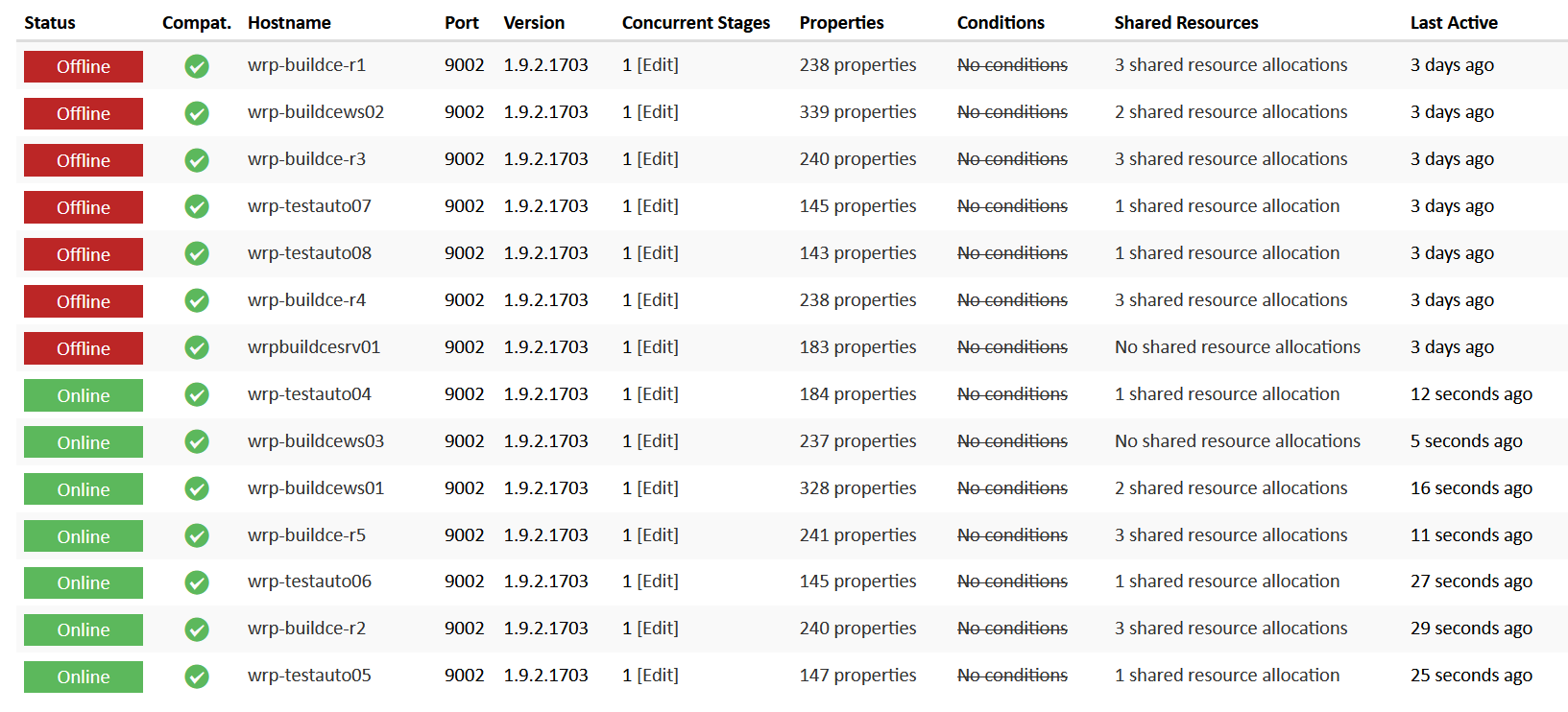
all that are “red” are operational, they all seem to be dead from around the same time +/- 20 minutes.
Can you please advise how to debug this ?
From time to time I get those SQL errors, may they be connected with agent discovery ?
[event-d58a72d9.txt](https://www.finalbuilder.com/forums/uploads/short-url/2tRYzbY6rsexsvKCIzuoIF6PR46.txt) (6.3 KB)
For agent wrp-buildce-r1 I found these entries from around the last time it was seen:
[event-f42c0a7c.txt](https://www.finalbuilder.com/forums/uploads/short-url/xmtCvvdNB6VOUO4VWqBNEFlihdU.txt) (813 Bytes)
[event-d58a72d9.txt](https://www.finalbuilder.com/forums/uploads/short-url/2tRYzbY6rsexsvKCIzuoIF6PR46.txt) (6.3 KB)
PS. wrpbuildcesrv01 is the server of Continua
---
### Author:  [@Vincent](https://www.finalbuilder.com/forums/u/Vincent)
#### Post date: [September 8, 2026, 8:04am UTC](https://www.finalbuilder.com/forums/t/server-not-seeing-agents/7833/2 "2026-09-08T08:04:49Z")
Hi Michal
I suspect the agent registration issues are a side effect of a database connectivity issue.
Looking at the logs, it looks like you are using Postgresql, is that the bundled version or your own postgresql install?
What is the load on the server, cpu usage, memory usage, i/o etc.
You say only rebooting the server works, did you try restarting the ContinuaCIPostgreSQL and ContinuaCI server service and the ContinuaCIPostgreSQL (in that order)?
---
### Author:  [@k3tchup](https://www.finalbuilder.com/forums/u/k3tchup)
#### Post date: [September 8, 2026, 8:35am UTC](https://www.finalbuilder.com/forums/t/server-not-seeing-agents/7833/3 "2026-09-08T08:35:44Z")
I used the bundled version of Postgres.
Usually load is not high, but the host resides on backup heavy virtualization and I suspect those problems occur in such moments, but I am not able to verify when each backup runs.
I usually just restart the whole machine as it’s faster for me, but next time I can try to restart only the services.
---
### Author:  [@Vincent](https://www.finalbuilder.com/forums/u/Vincent)
#### Post date: [September 8, 2026, 8:44am UTC](https://www.finalbuilder.com/forums/t/server-not-seeing-agents/7833/4 "2026-09-08T08:44:23Z")
Yeah virtualization backups can cause problems with i/o - I don’t really have an answer for that. We run our vms on proxmox servers, and backups do not cause us these issues.
We’ll look into this, but I doubt there is going to be a quick fix for it.
---
### Author:  [@k3tchup](https://www.finalbuilder.com/forums/u/k3tchup)
#### Post date: [September 8, 2026, 9:25am UTC](https://www.finalbuilder.com/forums/t/server-not-seeing-agents/7833/5 "2026-09-08T09:25:10Z")
I/O is one think, but I think there is some lock up keeping server from retrying the connection.
---
### Author:  [@k3tchup](https://www.finalbuilder.com/forums/u/k3tchup)
#### Post date: [September 11, 2026, 7:20am UTC](https://www.finalbuilder.com/forums/t/server-not-seeing-agents/7833/6 "2026-09-11T07:20:02Z")
I have once again encountered this problem. But the restart of services failed.
Postgres did restart but Continua Server failed to restart and stayed in this state:
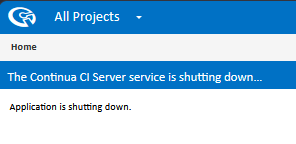
with error:
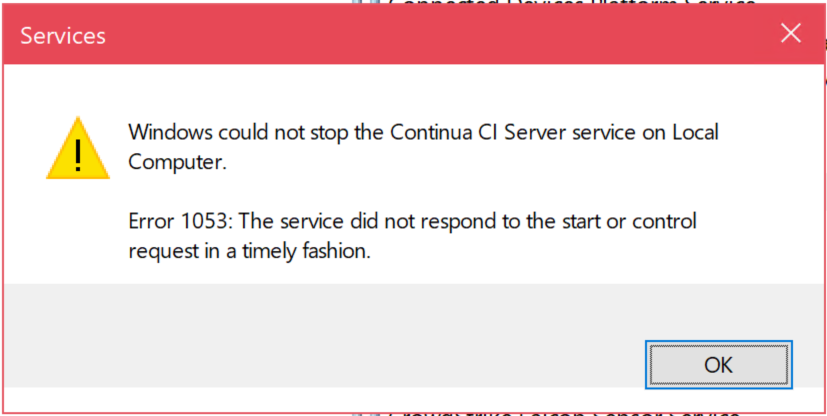
---
### Author:  [@Vincent](https://www.finalbuilder.com/forums/u/Vincent)
#### Post date: [September 11, 2026, 7:34am UTC](https://www.finalbuilder.com/forums/t/server-not-seeing-agents/7833/7 "2026-09-11T07:34:30Z")
What virtualisation server are you using?
What backup software are you using?
I have been searching through our support system and I couldn’t find any other cases of users experiencing this issue.
---
### Author:  [@k3tchup](https://www.finalbuilder.com/forums/u/k3tchup)
#### Post date: [September 11, 2026, 7:48am UTC](https://www.finalbuilder.com/forums/t/server-not-seeing-agents/7833/8 "2026-09-11T07:48:44Z")
Virtualization is on proxmox, I think the backups are also done via proxmox, but now there was no backup done.
Most of agents showed offline and the service could not be restarted, this I think is beyond database access problems.
P.S. after system reboot all goes back to normal.
---
### Author:  [@Vincent](https://www.finalbuilder.com/forums/u/Vincent)
#### Post date: [September 11, 2026, 8:16am UTC](https://www.finalbuilder.com/forums/t/server-not-seeing-agents/7833/9 "2026-09-11T08:16:22Z")
Ok - what version of windows? Does it have the proxmox agent software installed? VirtIO drivers etc?
I’m by no means a proxmox expert, but I am the person who setup our systems when we migrated a few years ago so I do have some knowledge of it.
Are you using Proxmox backup server (PBS) or just the built in backup feature (thats what we use).
The built in backup takes a snapshot - which pauses the machine for 1-2s - but we haven’t seen any issues with Continua on it.
What about antivirus software - do you have exclusions for the postgresql db folder `C:\ProgramData\VSoft\ContinuaCI\PostgreSQLDB`
We will do some research on this issue, but it’s difficult to find a cause when we cannot reproduce it here.
---
### Author:  [@k3tchup](https://www.finalbuilder.com/forums/u/k3tchup)
#### Post date: [September 11, 2026, 8:29am UTC](https://www.finalbuilder.com/forums/t/server-not-seeing-agents/7833/10 "2026-09-11T08:29:54Z")
We use pretty old Windows Server 2019, the rest I don’t know, I would have to ask IT for specifics.
It might be that the antivirus software messing something around, we already had some problems with Crowdstrike software.
---
### Author:  [@k3tchup](https://www.finalbuilder.com/forums/u/k3tchup)
#### Post date: [September 11, 2026, 8:54am UTC](https://www.finalbuilder.com/forums/t/server-not-seeing-agents/7833/11 "2026-09-11T08:54:35Z")
I have confirmed that we use builtin proxmox backup and we had a backup done today morning, so this lines up. I am guessing your setup is less stressed and it works, but here this hiccup might be longer and it breaks. Maybe you could add some connection retry mechanism ? Also it’s weird that the problem is with DB but the agents are offline, maybe that is the problem to fix ? Because CI works, builds start, just the agents are falsely offline.
---
### Author:  [@Vincent](https://www.finalbuilder.com/forums/u/Vincent)
#### Post date: [September 11, 2026, 8:58am UTC](https://www.finalbuilder.com/forums/t/server-not-seeing-agents/7833/12 "2026-09-11T08:58:18Z")
We will look into it.
---
### Author:  [@Vincent](https://www.finalbuilder.com/forums/u/Vincent)
#### Post date: [September 13, 2026, 1:52am UTC](https://www.finalbuilder.com/forums/t/server-not-seeing-agents/7833/13 "2026-09-13T01:52:27Z")
Hi Michał
So after me saying we have not had any issues caused by Proxmox backups - guess what happened last night 😒
The problem didn’t happen with a Continua CI machine, but it was on a machine with SQL Server - it was getting major timeouts with the data drive, and in the end the only thing that fixed it was a reboot.
This happened last week too, but I thought it was a windows update problem at the time and didn’t connect the dots.
This seems to be a virtio driver issue - if you google `proxmox virtio problems` then a lot comes up
**Storage and Driver Bugs**
- **Event ID 129 Warnings:** Versions of virtio-win between `0.1.215` and `0.1.262` can log `vioscsi` Event ID 129 (“Reset to device was issued”) in Windows, block I/O, or freeze reboots as outlined in the [Proxmox Windows VirtIO Drivers Wiki](https://pve.proxmox.com/wiki/Windows_VirtIO_Drivers). [[1](https://pve.proxmox.com/wiki/Windows_VirtIO_Drivers)]
- **Performance Regressions in Recent Versions:** VirtIO driver version `0.1.285` introduces stability and network/SCSI drop bugs for some users; community consensus strongly recommends sticking to or rolling back to stable version `0.1.271`. [[1](https://forum.proxmox.com/threads/w2025-virtio-nic-connection-drop-outs.174217/), [2](https://forum.proxmox.com/threads/severe-i-o-performance-degradation-on-windows-vms-server-2022-on-proxmox-8-9.182739/)]
- **VirtIO Block vs. VirtIO SCSI:** Standard VirtIO block configurations lack native TRIM support and run through limited I/O threading compared to VirtIO SCSI, which can cause performance cliffs or crashes under heavy stress. [[1](https://www.youtube.com/watch?v=KJsLDuUOoT4&vl=en&t=69)]
The eventlog had lots of those 129 events.
We had virtio `0.1.240` installed - which is in the range of unstable versions - I ended up installing virtio `0.1.271` - we’ll have to wait and see what happens with backups.
Worth getting your sysadmins to investigate.
---
### Author:  [@k3tchup](https://www.finalbuilder.com/forums/u/k3tchup)
#### Post date: [September 14, 2026, 8:18am UTC](https://www.finalbuilder.com/forums/t/server-not-seeing-agents/7833/14 "2026-09-14T08:18:52Z")
virtio tools updated to 0.1.271, let’s see if that helps
---
### Author:  [@k3tchup](https://www.finalbuilder.com/forums/u/k3tchup)
#### Post date: [September 23, 2026, 6:30pm UTC](https://www.finalbuilder.com/forums/t/server-not-seeing-agents/7833/15 "2026-09-23T18:30:49Z")
After the update it’s more stable, but it still happens, usually less agent get “lost”