# REGEX Result in Variable
**URL:** https://www.finalbuilder.com/forums/t/regex-result-in-variable/7324
**Category:** Discussion
**Created:** [January 16, 2023, 12:14pm UTC](https://www.finalbuilder.com/forums/t/regex-result-in-variable/7324 "2023-01-16T12:14:24Z")
**Posts on this page:** 7
**Page:** 1
### Author:  [@exploit-aq](https://www.finalbuilder.com/forums/u/exploit-aq)
#### Post date: [January 16, 2023, 12:14pm UTC](https://www.finalbuilder.com/forums/t/regex-result-in-variable/7324/1 "2023-01-16T12:14:24Z")
Hello Automise Team and other !
I’m looking for a way to stock the result of “Text Find / Replace action” with Regex in a variable.
For exemple, i try to find this in one file :
_([^\r\n]example[^\r\n])_
This Regex will find the first line which contain : example. I try in Notepad++ and with the action Text Find / Replace and it’s ok. Automise find the line.
But after, i have no idea how can i stock the result in a variable. I try to make a mix with actions “Read Text File”, Text Find / Replace", or to stock in variable all my text file to try anything with Variable action. Unfortunately, it isn’t a succes.
Version Automise : 5.0.0.970
Regards,
Pierrick
---
### Author:  [@Vincent](https://www.finalbuilder.com/forums/u/Vincent)
#### Post date: [January 17, 2023, 11:16pm UTC](https://www.finalbuilder.com/forums/t/regex-result-in-variable/7324/2 "2023-01-17T23:16:53Z")
You would have to use the script events to achieve this - I have attached and example project that shows this
[TextFindExample.atp5](https://www.finalbuilder.com/forums/uploads/short-url/2BnulAZj0vafQbq3nZq7cmr973m.atp5) (2.0 KB)
---
### Author:  [@exploit-aq](https://www.finalbuilder.com/forums/u/exploit-aq)
#### Post date: [January 18, 2023, 4:25pm UTC](https://www.finalbuilder.com/forums/t/regex-result-in-variable/7324/3 "2023-01-18T16:25:47Z")
Hi Vincent,
First at all, thank for your answer.
Then, i test and it isn’t exactly the resultat i want. In your exemple, you find the line but in the variable RESULTVAR, i have juste the word “example”. I need to have all the line (the result of the regex).
I continue my research and i find a solution :
1. I duplicate my file to have 2 same files (FileA / B.txt)
2. I use the action “Text Find / Replace” in one of them to find my REGEX : ([^\r\n]example[^\r\n]) and Replace by nothing. So i have one file with all information, and one without my regex.
3. I use a powershell script to compare two file and have the result of the difference :
Set-Location -Path “C:\YOUR\LOCATION”; $filebefore=“.\FileA.txt”; $file\_after=“.\FileB.txt”
Compare-Object -PassThru -ReferenceObject (Get-Content $filebefore) -DifferenceObject (Get-Content $file\_after) | Out-File “.\NoMatch.txt” -Append
4) I read NoMatch.txt and i have the result of ma research with the REGEX.
I’m not sure it’s the most efficiency but it’s working so i share for other.
Regex is so powerfull in automation. It’s a pity Automise can’t stock the result of the REGEX search. But anyway, i love this Tools !! So easy to automate a production environnement.
Thank for your help,
Pierrick
---
### Author:  [@Vincent](https://www.finalbuilder.com/forums/u/Vincent)
#### Post date: [January 18, 2023, 10:03pm UTC](https://www.finalbuilder.com/forums/t/regex-result-in-variable/7324/4 "2023-01-18T22:03:38Z")
> [@exploit-aq](#):
>
> Then, i test and it isn’t exactly the resultat i want. In your exemple, you find the line but in the variable RESULTVAR, i have juste the word “example”. I need to have all the line (the result of the regex).
I just used the regex you provided in the example.
If you change the regex to
```auto
([^\r\n].*example.*[^\r\n])
```
it will give you the whole line.
---
### Author:  [@exploit-aq](https://www.finalbuilder.com/forums/u/exploit-aq)
#### Post date: [January 19, 2023, 9:33am UTC](https://www.finalbuilder.com/forums/t/regex-result-in-variable/7324/5 "2023-01-19T09:33:32Z")
Hello Vincent,
My Bad, You are right !! So easylier.
But i need to understand how does the result is stocked in the variable RESULTVAR. I don’t understand.
I see an icon near:
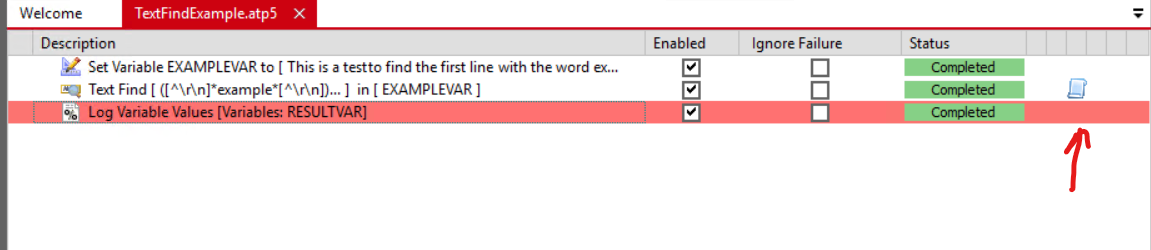
How do you do ? I check in all properties, i see nothing. What did i miss ?
Regards,
Pierrick
---
### Author:  [@Vincent](https://www.finalbuilder.com/forums/u/Vincent)
#### Post date: [January 19, 2023, 11:34am UTC](https://www.finalbuilder.com/forums/t/regex-result-in-variable/7324/6 "2023-01-19T11:34:29Z")
Each action has script events that you can fill out. To get to the script editor, highlight the action and then on the View menu, Script Editor (it’s a tab at the bottom alongside the Log etc).
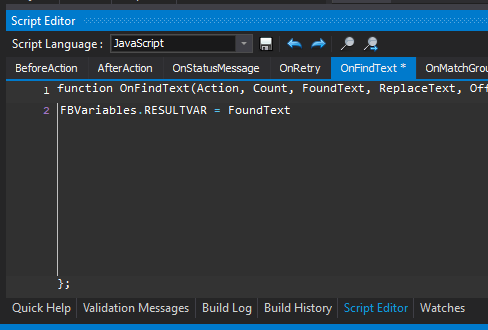
(screenshot is from FinalBuilder which is based on the same code as Automise).
---
### Author:  [@exploit-aq](https://www.finalbuilder.com/forums/u/exploit-aq)
#### Post date: [January 19, 2023, 12:42pm UTC](https://www.finalbuilder.com/forums/t/regex-result-in-variable/7324/7 "2023-01-19T12:42:40Z")
Ho ! I didn’t know this function. Thank a lot.