# IIS anonymous user access
**URL:** https://www.finalbuilder.com/forums/t/iis-anonymous-user-access/7055
**Category:** Discussion
**Created:** [June 8, 2021, 11:00am UTC](https://www.finalbuilder.com/forums/t/iis-anonymous-user-access/7055 "2021-06-08T11:00:25Z")
**Posts on this page:** 2
**Page:** 1
### Author:  [@Jerzy](https://www.finalbuilder.com/forums/u/Jerzy)
#### Post date: [June 8, 2021, 11:00am UTC](https://www.finalbuilder.com/forums/t/iis-anonymous-user-access/7055/1 "2021-06-08T11:00:25Z")
Hi, I have an issue with reports in my configuration.
I have report copied to output folder of working directory just fine, but ContinuaCI can’t display it in Build reports tab. I get message"The current IIS anonymous user does not have access to the report [file]". I did my best to follow advice included in the message: I enabled anonymous authentication for ContinuaCI site and in revelant folders I gave read access to ContinuaCI ApplicationPool.
However I am operating on IIS 10.0.17763.1 and it didn’t do the trick. Can you confirm I should do something more and what would it be? Or I missed something and you might have educated guess on what would it that be?
---
### Author:  [@Sparky](https://www.finalbuilder.com/forums/u/Sparky)
#### Post date: [June 9, 2021, 2:33am UTC](https://www.finalbuilder.com/forums/t/iis-anonymous-user-access/7055/2 "2021-06-09T02:33:14Z")
Hi @Jerzy,
Are you giving permissions to the correct folder?
Ensure that you give the `IIS AppPool\ContinuaCI` user read access to the `Ws` folder under your Continua CI data share folder on the server, e.g. `C:\ContinuaShare\Ws`.
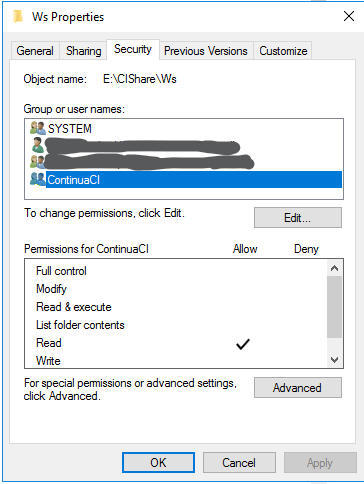
This works for us on IIS `v10.0.14393.0`. We’ve no reason to believe it would work differently for more recent versions of IIS10.