# Getting the versionnumber from an assembly.cs info a Finalbuilder variable
**URL:** https://www.finalbuilder.com/forums/t/getting-the-versionnumber-from-an-assembly-cs-info-a-finalbuilder-variable/7433
**Category:** Discussion
**Created:** [December 6, 2023, 2:05pm UTC](https://www.finalbuilder.com/forums/t/getting-the-versionnumber-from-an-assembly-cs-info-a-finalbuilder-variable/7433 "2023-12-06T14:05:03Z")
**Posts on this page:** 5
**Page:** 1
### Author:  [@marius](https://www.finalbuilder.com/forums/u/marius)
#### Post date: [December 6, 2023, 2:05pm UTC](https://www.finalbuilder.com/forums/t/getting-the-versionnumber-from-an-assembly-cs-info-a-finalbuilder-variable/7433/1 "2023-12-06T14:05:03Z")
Hello,
I’m trying to get the versionnumber from an assembly.cs file. I do this with an Powershell script and I can get and print the version or put it in a variable.
But how do I the Powershell variable into Finalbuilder?
Thanks for any help,
Marius
---
### Author:  [@Vincent](https://www.finalbuilder.com/forums/u/Vincent)
#### Post date: [December 7, 2023, 1:49am UTC](https://www.finalbuilder.com/forums/t/getting-the-versionnumber-from-an-assembly-cs-info-a-finalbuilder-variable/7433/2 "2023-12-07T01:49:32Z")
If you are using the Execute Powershell script action, getting the value into a variable is complicated - you would have to use the [Output Monitors](https://wiki.finalbuilder.com/display/FB8/Using+Output+Monitors) feature.
The alternative to using powershell is to use the Text Find/Replace action with some regex, e.g
```plaintext
\s*\[assembly\s*:\s*AssemblyVersion\(\"(.*)\"\)\]
```
You may need to tweak the regex a bit, the above regex worked for me but I only tested it with a single file
Then in the OnMatchGroup script event for the action use some javascript to set the FB variable (in this case mine is called FileVersionStr)
```javascript
if (GroupIndex > 0) { //group 0 is always the full match
FBVariables.FileVersionStr = Text
}
```
---
### Author:  [@marius](https://www.finalbuilder.com/forums/u/marius)
#### Post date: [December 12, 2023, 5:14pm UTC](https://www.finalbuilder.com/forums/t/getting-the-versionnumber-from-an-assembly-cs-info-a-finalbuilder-variable/7433/3 "2023-12-12T17:14:01Z")
Hello Vincent,
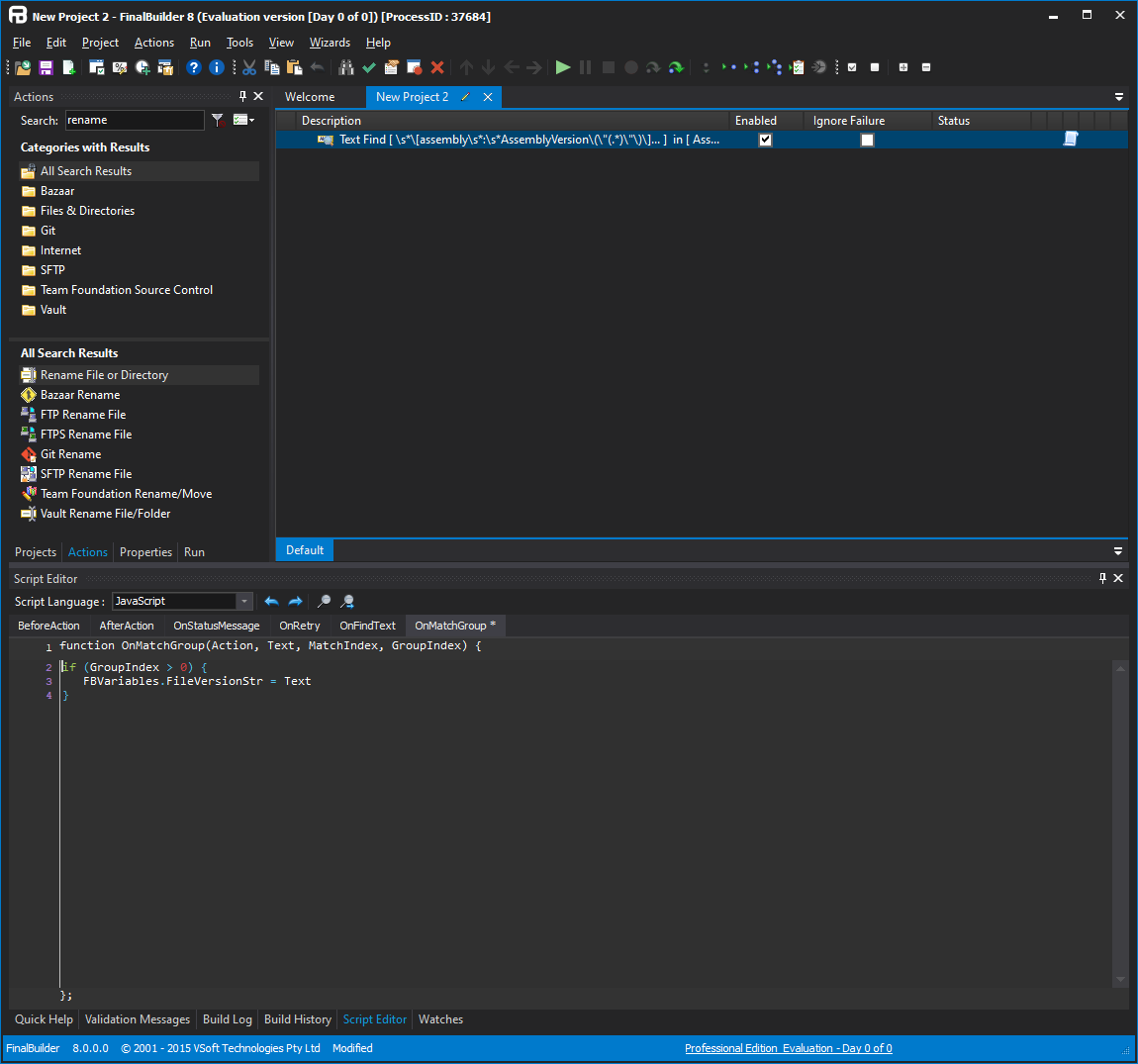
The Find/Replace seems more promising than the PowerShell Script so I opted for that, I just cannot seem to find the OnMatchGroup event in the Find/Replace action? Not sure where this event should be or how it is called in the FB userinterface (what am I overlooking?)
Could you please point me in the right direction?
Using Finalbuilder 8.0.0.3104
Thanks/Bedankt,
Marius
---
### Author:  [@Vincent](https://www.finalbuilder.com/forums/u/Vincent)
#### Post date: [December 12, 2023, 9:36pm UTC](https://www.finalbuilder.com/forums/t/getting-the-versionnumber-from-an-assembly-cs-info-a-finalbuilder-variable/7433/4 "2023-12-12T21:36:07Z")
Select the action in the target, then go to the Script Editor tab (use the View menu)
---
### Author:  [@marius](https://www.finalbuilder.com/forums/u/marius)
#### Post date: [December 14, 2023, 11:56am UTC](https://www.finalbuilder.com/forums/t/getting-the-versionnumber-from-an-assembly-cs-info-a-finalbuilder-variable/7433/5 "2023-12-14T11:56:55Z")
Hello Vincent,
Ah thanks, in the the tabs in the lower part instead of popup options!
Thanks/Bedankt/Regards,
Marius