# Empty object retrieving WinRAR options using VBScript
**URL:** https://www.finalbuilder.com/forums/t/empty-object-retrieving-winrar-options-using-vbscript/7232
**Category:** Bugs
**Created:** [May 27, 2022, 9:34am UTC](https://www.finalbuilder.com/forums/t/empty-object-retrieving-winrar-options-using-vbscript/7232 "2022-05-27T09:34:39Z")
**Posts on this page:** 2
**Page:** 1
### Author:  [@msanz](https://www.finalbuilder.com/forums/u/msanz)
#### Post date: [May 27, 2022, 9:34am UTC](https://www.finalbuilder.com/forums/t/empty-object-retrieving-winrar-options-using-vbscript/7232/1 "2022-05-27T09:34:40Z")
I’m trying to get WinRAR options using VBScript as per the documentation. Just like this:
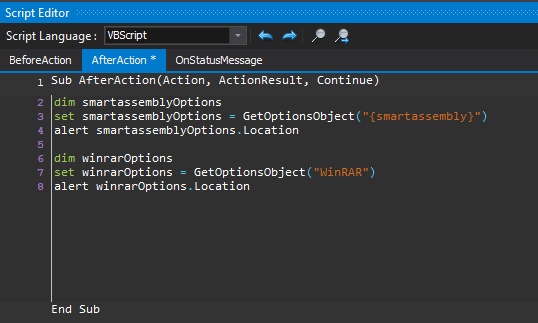
But an empty object is returned. If I try to get {smartassembly} options it works fine, so I assume I’m doing it the correct way. What can be happening?
Please find the whole process of execution in this video: [https://siam-it.com/pub/FinalBuilder/b9911260-aa50-49c6-a3d0-82c0ca053f03/empty\_winrar\_options.wmv](https://siam-it.com/pub/FinalBuilder/b9911260-aa50-49c6-a3d0-82c0ca053f03/empty_winrar_options.wmv)
---
### Author:  [@Vincent](https://www.finalbuilder.com/forums/u/Vincent)
#### Post date: [May 31, 2022, 1:27am UTC](https://www.finalbuilder.com/forums/t/empty-object-retrieving-winrar-options-using-vbscript/7232/2 "2022-05-31T01:27:03Z")
The issue here is that the options are inconsistent in the naming of properties - sadly a victim of different devs having worked on the product over the years.
This works
```vbscript
dim winrarOptions
set winrarOptions = GetOptionsObject("WinRAR")
alert winrarOptions.WinRARPath
```
I have added `.Location` as an alias for the next update.