# 1.6.0.131 Office365 as notification publisher not working
**URL:** https://www.finalbuilder.com/forums/t/1-6-0-131-office365-as-notification-publisher-not-working/5967
**Category:** Bugs
**Created:** [April 9, 2015, 2:32am UTC](https://www.finalbuilder.com/forums/t/1-6-0-131-office365-as-notification-publisher-not-working/5967 "2015-04-09T02:32:20Z")
**Posts on this page:** 17
**Page:** 1
### Author:  [@skermajo](https://www.finalbuilder.com/forums/u/skermajo)
#### Post date: [April 9, 2015, 2:32am UTC](https://www.finalbuilder.com/forums/t/1-6-0-131-office365-as-notification-publisher-not-working/5967/1 "2015-04-09T02:32:20Z")
Hi Guys,
We’ve made the move to Office365, however Continua is having some problems sending mail:
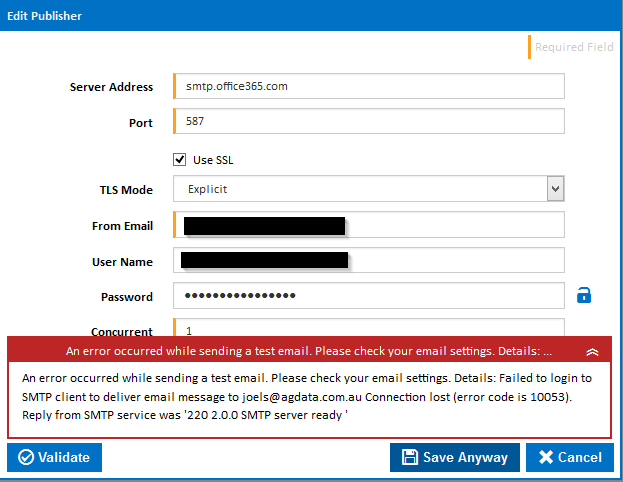 

This issue occurs in both the initial 1.6 release and the latest release (not sure about previous versions).
The only specifics about this issue I can find that look relevant are here: [https://www.eldos.com/forum/read.php?FID=7&TID=4888](https://www.eldos.com/forum/read.php?FID=7&TID=4888)
The general Office365 information is that TLS (explicit on port 587) is required (we have other services sending mail sucessfully). The only specific information I can find about Office365 TLS is this: TLS v1.1 or later is required, and a number of ciphers are supported. If your application or device is having trouble with the STARTTLS exchange, then you may want to make sure all patches are applied.
See ‘Clent SMTP Submission’ here: [https://technet.microsoft.com/library/dn554323.aspx](https://technet.microsoft.com/library/dn554323.aspx)
Can I somehow confirm what TLS version Continua is using?
Cheers
Joel
---
### Author:  [@skermajo](https://www.finalbuilder.com/forums/u/skermajo)
#### Post date: [April 9, 2015, 2:33am UTC](https://www.finalbuilder.com/forums/t/1-6-0-131-office365-as-notification-publisher-not-working/5967/2 "2015-04-09T02:33:08Z")
Sorry, just realised this is the wrong forum
---
### Author:  [@Vincent](https://www.finalbuilder.com/forums/u/Vincent)
#### Post date: [April 9, 2015, 12:56pm UTC](https://www.finalbuilder.com/forums/t/1-6-0-131-office365-as-notification-publisher-not-working/5967/3 "2015-04-09T12:56:58Z")
Moved to correct forum.
As far as I can tell, the eldos library defaults to :
SBSSLConstants.Unit.sbSSL2 | SBSSLConstants.Unit.sbSSL3 | SBSSLConstants.Unit.sbTLS1 | SBSSLConstants.Unit.sbTLS11;
We’re not setting the tls versions ourself.
I’ll sign up for a free office365 trial tomorrow and see if I can send mail through it.
---
### Author:  [@Vincent](https://www.finalbuilder.com/forums/u/Vincent)
#### Post date: [April 10, 2015, 10:24am UTC](https://www.finalbuilder.com/forums/t/1-6-0-131-office365-as-notification-publisher-not-working/5967/4 "2015-04-10T10:24:22Z")
Hi Joel
Not having much luck, will have to contact eldos for some help. I’ve tried every combination of TLS/ssl settings known to man and could not figure it out.
---
### Author:  [@skermajo](https://www.finalbuilder.com/forums/u/skermajo)
#### Post date: [April 13, 2015, 11:36am UTC](https://www.finalbuilder.com/forums/t/1-6-0-131-office365-as-notification-publisher-not-working/5967/5 "2015-04-13T11:36:51Z")
Thanks Vincent, we really appreciate the extra effort!
We’ve setup a relay here locally to temporarily get around the issue, but obviously having Continua being able to send direct would be ideal.
---
### Author:  [@Vincent](https://www.finalbuilder.com/forums/u/Vincent)
#### Post date: [April 15, 2015, 12:22pm UTC](https://www.finalbuilder.com/forums/t/1-6-0-131-office365-as-notification-publisher-not-working/5967/6 "2015-04-15T12:22:22Z")
This problem is driving me nuts. If I take the code out of Continua and use it in a console app it works fine, but fails in Continua. Makes no sense and Eldos can’t reproduce the problem. Looking into alternative libraries, found one called MailKit which looks promising, worked first time in a test, now to try it in Continua.
---
### Author:  [@Vincent](https://www.finalbuilder.com/forums/u/Vincent)
#### Post date: [April 16, 2015, 8:47am UTC](https://www.finalbuilder.com/forums/t/1-6-0-131-office365-as-notification-publisher-not-working/5967/7 "2015-04-16T08:47:12Z")
Hi Joel
I ended up having to switch smpt libraries to get it working. Eldos worked fine outside of Continua but the same code failed when in Continua! Eldos were not able to figure out why. We are now using MailKit (open source on github) and it worked first time! I’ve tested it with office365, gmail and our mail server (smartermail) and so far so good.
[http://downloads.finalbuilder.com/downloads/continua/1.6/ContinuaCI.Server.Setup\_x64\_1.6.0.146.exe](http://downloads.finalbuilder.com/downloads/continua/1.6/ContinuaCI.Server.Setup_x64_1.6.0.146.exe)
[http://downloads.finalbuilder.com/downloads/continua/1.6/ContinuaCI.Agent.Setup\_x64\_1.6.0.146.exe](http://downloads.finalbuilder.com/downloads/continua/1.6/ContinuaCI.Agent.Setup_x64_1.6.0.146.exe)
[http://downloads.finalbuilder.com/downloads/continua/1.6/ContinuaCI.Server.Setup\_1.6.0.146.exe](http://downloads.finalbuilder.com/downloads/continua/1.6/ContinuaCI.Server.Setup_1.6.0.146.exe)
[http://downloads.finalbuilder.com/downloads/continua/1.6/ContinuaCI.Agent.Setup\_1.6.0.146.exe](http://downloads.finalbuilder.com/downloads/continua/1.6/ContinuaCI.Agent.Setup_1.6.0.146.exe)
---
### Author:  [@skermajo](https://www.finalbuilder.com/forums/u/skermajo)
#### Post date: [April 20, 2015, 12:58pm UTC](https://www.finalbuilder.com/forums/t/1-6-0-131-office365-as-notification-publisher-not-working/5967/8 "2015-04-20T12:58:40Z")
Thanks Vincent.
I wish I had better news. I’ve updated our server and setup Office365, however no mail seems to be sent. The publisher settings validate, however no test email arrives. Normal build notifications do not seem to arrive either. There is nothing in the event log. We’ve checked what we can in Office365, but Continua doesn’t seem to make it to Office365 at all (as far as we can tell).
I then tried reverting back to our smtp relay config to at least prove email could work, however I had problems as the publisher validation seemed to still want to authenticate, even though the username/password fields were empty. The error reads: An error occurred while sending a test email. Please check your email settings. Details: Failed to login to SMTP client to deliver email message to [joels@agdata.com.au](mailto:joels@agdata.com.au) The SMTP server does not support authentication.
The error is correct, as our relay does not support authentication, however Continua should not have been trying to authenticate as there was no username/password set.
---
### Author:  [@Vincent](https://www.finalbuilder.com/forums/u/Vincent)
#### Post date: [April 20, 2015, 1:38am UTC](https://www.finalbuilder.com/forums/t/1-6-0-131-office365-as-notification-publisher-not-working/5967/9 "2015-04-20T01:38:22Z")
Hi Joel
I guess the two libraries do things differently, as the code is almost identical. What smtp server are you using for a relay? I’ll need to set one up here to test with.
---
### Author:  [@skermajo](https://www.finalbuilder.com/forums/u/skermajo)
#### Post date: [April 20, 2015, 1:45am UTC](https://www.finalbuilder.com/forums/t/1-6-0-131-office365-as-notification-publisher-not-working/5967/10 "2015-04-20T01:45:57Z")
We’re using IIS on Server 2012 R2.
---
### Author:  [@Vincent](https://www.finalbuilder.com/forums/u/Vincent)
#### Post date: [April 20, 2015, 2:12am UTC](https://www.finalbuilder.com/forums/t/1-6-0-131-office365-as-notification-publisher-not-working/5967/11 "2015-04-20T02:12:14Z")
Thanks, setting it up now. I have added code to not try authenticating if no username specified, will test once it’s finished installing.
---
### Author:  [@Vincent](https://www.finalbuilder.com/forums/u/Vincent)
#### Post date: [April 20, 2015, 2:59am UTC](https://www.finalbuilder.com/forums/t/1-6-0-131-office365-as-notification-publisher-not-working/5967/12 "2015-04-20T02:59:50Z")
Ok, got it working through a relay, I just needed to not attempt authentication when no username set. I guess the old library took care of that. It’s working fine for me here with [smtp.office365.com](http://smtp.office365.com) as well. I did find an issue with setting the To address though, but not sure if that was the problem or not.
I’m running a build now, will post here when it’s uploaded. If this build doesn’t work then can you try debug logging :
[http://wiki.finalbuilder.com/display/continua/Debug+Logging](http://wiki.finalbuilder.com/display/continua/Debug+Logging)
This should show what’s going on when sending an email fails.
---
### Author:  [@Vincent](https://www.finalbuilder.com/forums/u/Vincent)
#### Post date: [April 20, 2015, 3:12am UTC](https://www.finalbuilder.com/forums/t/1-6-0-131-office365-as-notification-publisher-not-working/5967/13 "2015-04-20T03:12:44Z")
Ok here’s another build to test :
[http://downloads.finalbuilder.com/downloads/continua/1.6/ContinuaCI.Server.Setup\_x64\_1.6.0.150.exe](http://downloads.finalbuilder.com/downloads/continua/1.6/ContinuaCI.Server.Setup_x64_1.6.0.150.exe)
[http://downloads.finalbuilder.com/downloads/continua/1.6/ContinuaCI.Agent.Setup\_x64\_1.6.0.150.exe](http://downloads.finalbuilder.com/downloads/continua/1.6/ContinuaCI.Agent.Setup_x64_1.6.0.150.exe)
[http://downloads.finalbuilder.com/downloads/continua/1.6/ContinuaCI.Server.Setup\_1.6.0.150.exe](http://downloads.finalbuilder.com/downloads/continua/1.6/ContinuaCI.Server.Setup_1.6.0.150.exe)
[http://downloads.finalbuilder.com/downloads/continua/1.6/ContinuaCI.Agent.Setup\_1.6.0.150.exe](http://downloads.finalbuilder.com/downloads/continua/1.6/ContinuaCI.Agent.Setup_1.6.0.150.exe)
---
### Author:  [@skermajo](https://www.finalbuilder.com/forums/u/skermajo)
#### Post date: [April 20, 2015, 3:54am UTC](https://www.finalbuilder.com/forums/t/1-6-0-131-office365-as-notification-publisher-not-working/5967/14 "2015-04-20T03:54:28Z")
Thanks Vincent. That’s fixed both our Office365 sending and also sending unauthenticated via the local relay!
The only hiccup we had was that if you specify a different ‘From Email’ address, Continua tries to send mail ‘On behalf of’ as opposed to sending ‘as’ that address. As such, we had to give the email username permission to send on behalf of, which is a different permission to ‘as’. This also shows differently in email clients - rather than the email being from ‘Build Master’, our emails are now from ‘Service Send on behalf of Build Master’. It’s not a big deal, and I’m sure everyone would have different preferred behaviour. Our own preference would be to send ‘as’ the from email address rather than on behalf of.
Other than that that latest build is working flawlessly! Appreciate the extra effort you guys go to as always in your support.
---
### Author:  [@Vincent](https://www.finalbuilder.com/forums/u/Vincent)
#### Post date: [April 20, 2015, 6:21am UTC](https://www.finalbuilder.com/forums/t/1-6-0-131-office365-as-notification-publisher-not-working/5967/15 "2015-04-20T06:21:40Z")
Hi Joel
If the Sender address is different to the From address then it will show as on behalf of… there is no way around that. The safest option is to use the UserName as the Sender, as per the RFC : [http://tools.ietf.org/html/rfc4021#section-2.1.2](http://tools.ietf.org/html/rfc4021#section-2.1.2)
If you add permission for “Service Send” to “Send email from this mailbox” under the “Build Master” account (different form Send on behalf of) then you will not see the behalf of in the client.
FWIW, office 356 seems to be the slowest smtp server I have ever used… logging in and sending a single email takes around 20s here (100mbit connection).
---
### Author:  [@skermajo](https://www.finalbuilder.com/forums/u/skermajo)
#### Post date: [April 20, 2015, 7:38am UTC](https://www.finalbuilder.com/forums/t/1-6-0-131-office365-as-notification-publisher-not-working/5967/16 "2015-04-20T07:38:19Z")
Thanks Vincent,
We had already added “Send email from this mailbox” permission for ServiceSend to send mail ‘as’ Build Master (as you point out), and we have other services successfully sending mail ‘as’ other addresses in this fashion. Continua is the only service we have encountered that seems to insist on sending ‘on behalf of’. We have in-house code that is happy to send ‘as’ also.
I think we might be losing something in communication. The ‘ServiceSend’ user has permission to send email ‘as’ the BuildMaster. If we leave everything configured as it was working for all other services, Continua fails to send mail - Office365 errors saying that ServiceSend does not have permission to send on ‘behalf of’ BuildMaster. We have to go and add specific ‘behalf of’ permissions using the powershell command “set-mailbox -GrantSendOnBehalfOf” (as Office365 doesn’t expose this setting in UI). All other services we have do not require this permission, and are happy to send mail ‘as’ another address (with the appropriate permission you pointed to).
Our communication wires might be getting crossed somewhere - or we’ve missed something really obvious this end.
And yeah, Office365 is slow over SMTP
---
### Author:  [@Vincent](https://www.finalbuilder.com/forums/u/Vincent)
#### Post date: [April 20, 2015, 7:45am UTC](https://www.finalbuilder.com/forums/t/1-6-0-131-office365-as-notification-publisher-not-working/5967/17 "2015-04-20T07:45:45Z")
Ok, for applications that can send ok, have a look at the headers for the email, compare them to the headers that Continua is setting. I’m curious, in the other applications what are you setting as the from/sender etc?